
 XM
XM Bybit
Bybit Binance
 Robinhood
 Webull
 IC Markets
 Pepperstone
 OKX
OKX Vantage
 VT Markets
 BingX
BingX Gate.io
 Kucoin
 MEXC
MEXC Exness
 Bitget
FTX Exchange – a name that’s no stranger to cryptocurrency traders. However, for those who are new to the crypto market, there might still be limited knowledge about this FTX exchange. So, this article about “What is FTX Exchange” will provide you with comprehensive information and knowledge about FTX, including details about the founder of FTX, how to register on FTX, how to deposit and withdraw coins on FTX, whether FTX is safe, and a detailed guide on how to use FTX effectively. Let’s get started!
1. WHAT IS FTX EXCHANGE?
FTX is an online trading platform for cryptocurrencies. The FTX exchange strives to build a platform robust enough for professional traders while remaining suitable for newcomers to the market. FTX supports spot trading, futures trading, and margin trading with leverage. Additionally, as of early February, FTX US announced plans to soon offer stock trading services to customers in the United States.
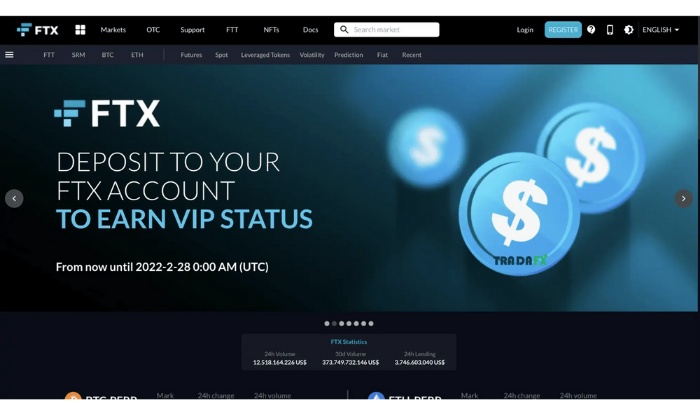
The FTX exchange attracts users through its improved trading features, suitable and appealing trading products. FTX OTC also offers top-notch customer support features, including trading resources, educational materials, and support in up to 10 languages.
1.1. Who owns FTX?
FTX Global was founded in May 2019 by the duo Sam Bankman-Fried and Gary Wang. Currently, Sam serves as the CEO of FTX. Before founding FTX, Sam was an ETF trader at Jane Street Capital. He graduated with a degree in Physics from MIT and was also the designer of the automated OTC trading system.
Gary Wang, a former software engineer at Google, currently serves as the Chief Technology Officer (CTO) of FTX. Prior to FTX, in 2017, this duo founded Alameda Research, a research firm providing quantitative trading analysis to liquidity providers in the cryptocurrency market. Today, Alameda Research also supports FTX in protecting its Order Book.
1.2. Where is FTX based?
FTX is currently headquartered in the Bahamas, located in the western Atlantic Ocean, about 100 km southeast of Florida, USA. Initially, FTX’s main office was based in Hong Kong. The decision to move from Hong Kong to the Bahamas was carefully considered, as the Bahamas is one of the first places to implement comprehensive cryptocurrency regulations.
2. HOW TO REGISTER ON FTX EXCHANGE
Similar to other cryptocurrency exchanges, creating an FTX account is quite simple and quick. You can register an FTX account via their website HERE or through the FTX app. Both the CH Play and App Store platforms allow free downloads of the FTX app.
2.1. Step-by-Step Guide to Creating an FTX Account
Once you access the FTX website interface, click on “Register”.
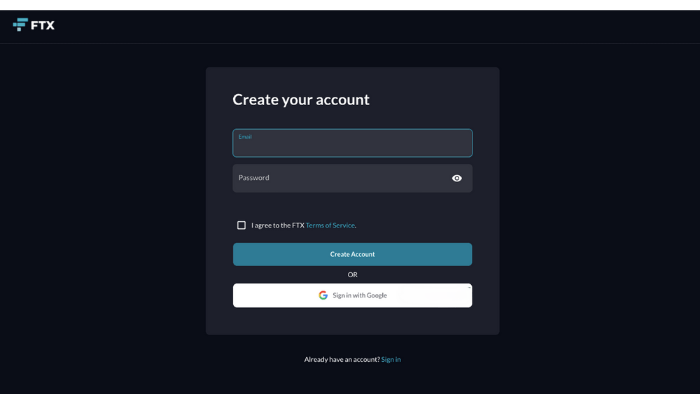
Here, you enter your email address and create a password in the “Password” field, then click “Create Account.” Alternatively, you can quickly register using your email by clicking “Sign in with Google.” Note: Before clicking, make sure to tick the box to confirm your agreement with the terms of service.
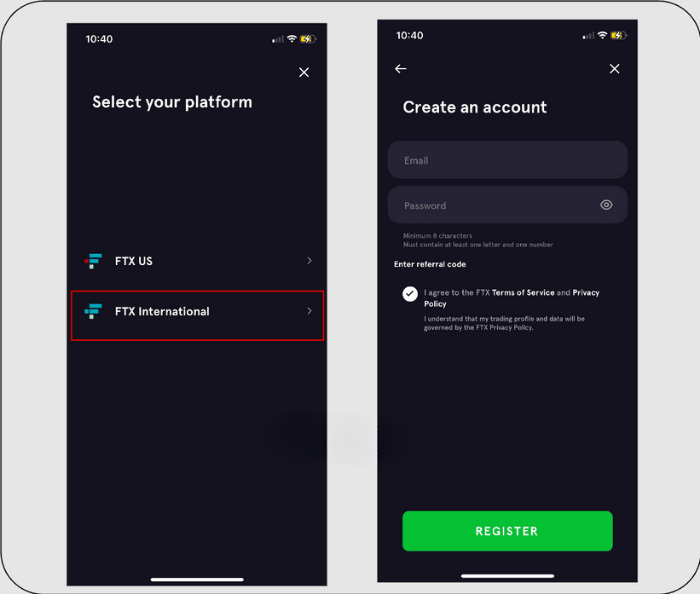
Registering an FTX account via the FTX app is slightly different. You need to choose your platform, as the FTX app separates into FTX International and FTX US. After that, the registration process is the same as on the FTX website.
2.2. How to Successfully KYC on FTX
KYC is a very familiar step, especially for cryptocurrency traders. FTX is no exception—you need to understand what KYC is to avoid restrictions when using the services of this exchange.
After successful registration, the system will automatically move to the section for entering personal information to verify your account. Simply follow the step-by-step KYC instructions provided by FTX.
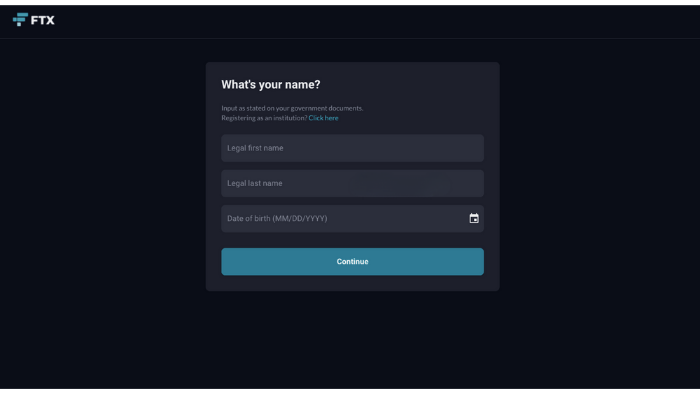
– Enter your first name in the “Legal First Name” field.
– Enter your last name in the “Legal Last Name” field.
– In the final field, “Date of Birth,” enter your date of birth. Then click “Continue.”
Next, fill in address details such as street name, city, etc. The Postal Code for each province or city will differ, and you can look it up in the article “Billing Zip Code” by Forex.
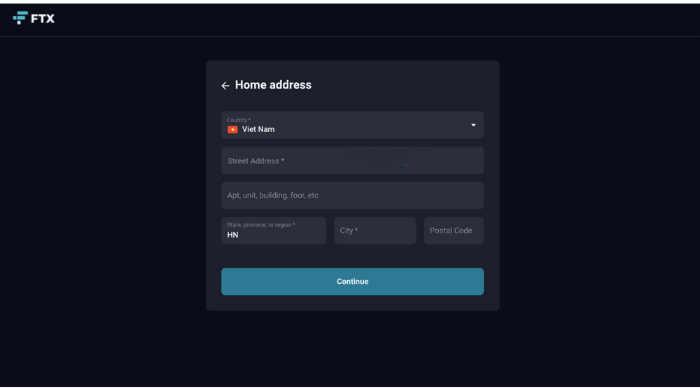
Finally, to complete Level 1 verification, enter your phone number so FTX can send a verification code. A 6-character code will be sent to the phone number you provide. Enter that code in the “Verification Code” field and click “Submit.”
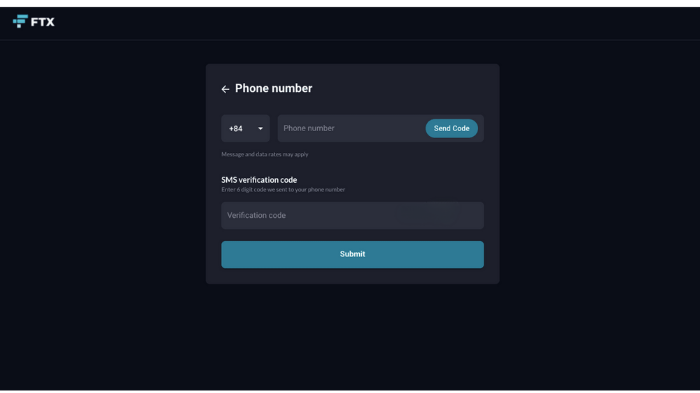
Note: You need to enter the correct information as it appears on the documents you will upload in the next step to successfully complete KYC on FTX. Once the information is accurate, FTX will send a confirmation email upon completing Level 1 verification.
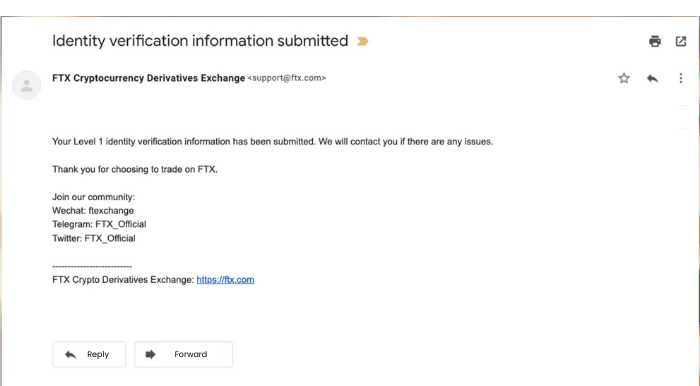
If you only complete Level 1 KYC on FTX, your withdrawal limit will be $2,000 per day. To have unlimited deposits and withdrawals of coins on FTX, as well as deposits and withdrawals via fiat gateways, you need to complete Level 2 KYC on FTX.
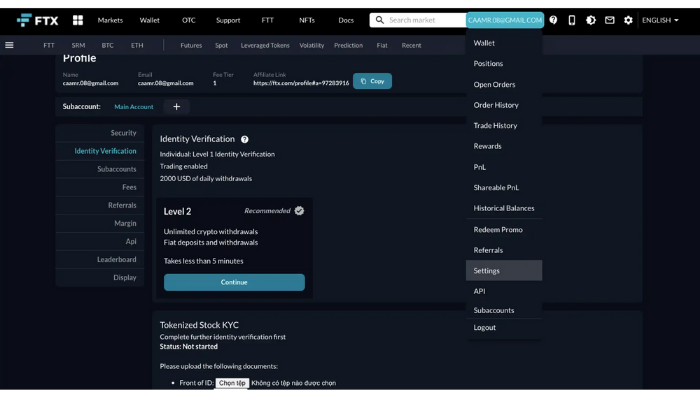
Go to the account section -> Select Settings -> Identity Verification. Then click “Continue” and follow the instructions. You can choose one of the three methods suggested by FTX to verify your account.
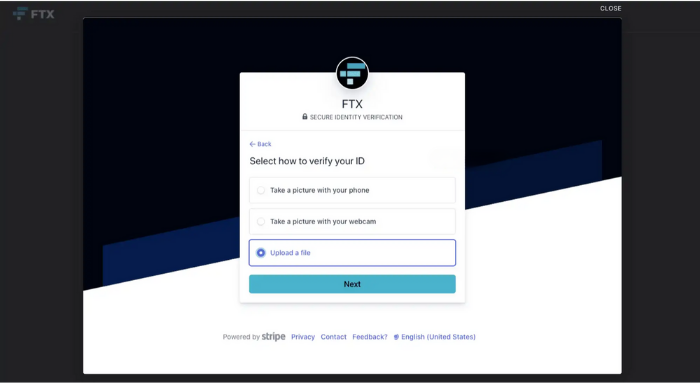
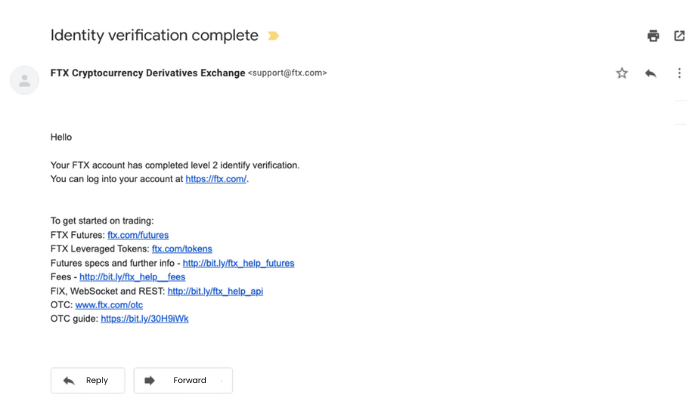
Next, select the type of document for verification. Upload both the front and back images of the document. Follow the instructions to submit the images, and you will receive an email confirming that your documents have been received. Once KYC on FTX is successful, the exchange will send you a notification email. If there are any issues with the documents, they will contact you for further verification.
3. HOW TO USE FTX EXCHANGE
After the KYC guide, the next step is to explain how to trade on FTX. But first, let’s explore the main features that the exchange offers!
– Market: Access the trading interface of FTX.
– Wallet: Access your wallet (including both main and sub-wallets). The features of the wallet will be explained in detail in the section on how to deposit funds into FTX.

– FTX OTC: Fast trading with no additional fees other than the spread.
– Support: If you have any questions or encounter issues, you can contact FTX support through this section.
– FTT: This is the name of FTX’s token. In this section, traders can choose to buy, sell, or stake FTT tokens.
– NFTs: The NFT trading feature was officially launched by FTX in September 2021. Traders can sell NFTs they have created or buy NFTs from others. (Fees: 0% for buyers, 2% for sellers).
3.1. How to Deposit and Withdraw Coins on FTX
Access the homepage of the FTX exchange, click on your account name -> Select Wallet. The FTX wallet is where you manage the coins you have deposited, purchased on the FTX exchange, and your deposit/withdrawal history.
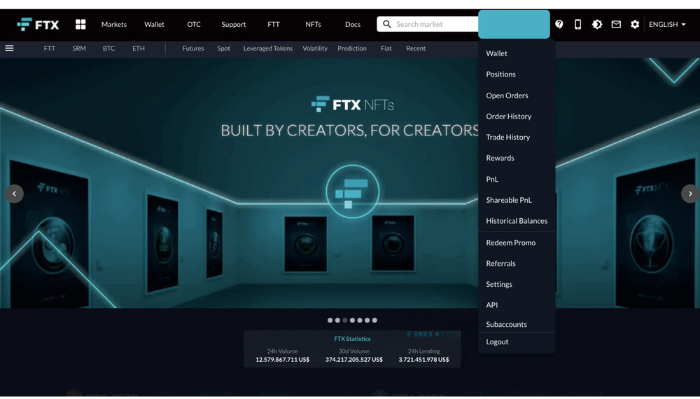
If you want to deposit coins into your FTX wallet, select the Deposit tab. For withdrawals, choose Withdrawals -> Click on “Make a Deposit” or “Make a Withdrawal.”
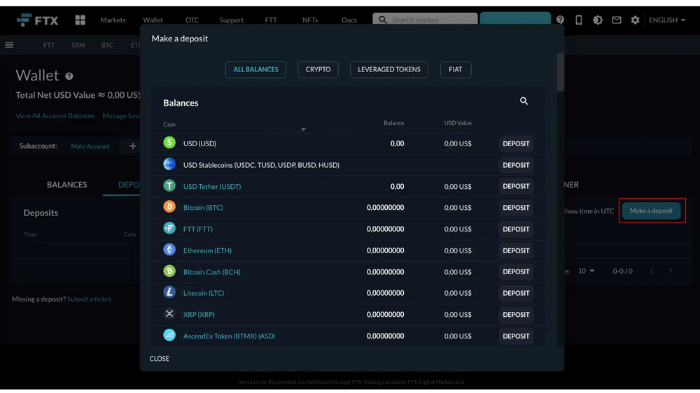
Then, select the cryptocurrency you want to deposit or withdraw. Click the “Deposit” or “Withdrawal” button next to the cryptocurrency name.
If you’re depositing coins into FTX, you will see a list of wallet addresses for different networks like ERC-20, TRC20, SOL, etc. Copy the wallet address and provide it to the sender or use it to sell coins to you.
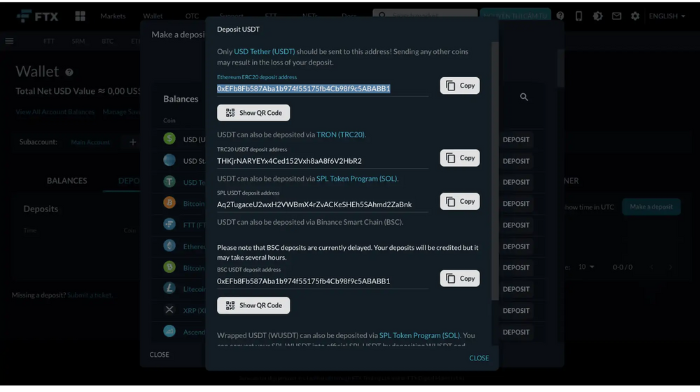
If you are withdrawing coins, enter the wallet address in the Address field. You can choose the network, such as TRC20, SOL, etc., just like when depositing coins into your FTX wallet.
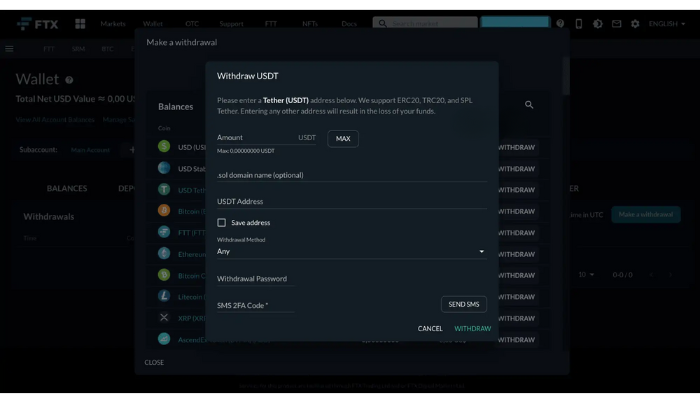
If you set up a withdrawal password, in addition to entering the code from the 2FA app, you will also need to enter that password in order to withdraw coins. Apart from the blockchain network fees, traders will not incur any additional fees when depositing or withdrawing coins from their FTX wallet.
3.2. How to Buy and Sell on FTX
FTX is known as a leading cryptocurrency derivatives exchange. Traders can buy coins on FTX through Spot, Futures, and other types of transactions. On the menu bar of the homepage, select Markets, then choose the type of coin purchase method on FTX.
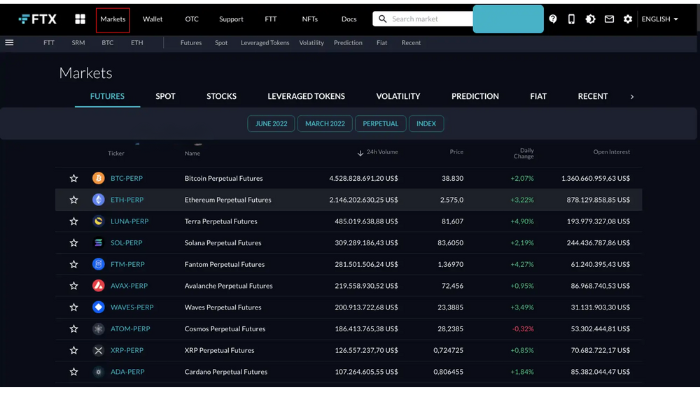
Then, select the cryptocurrency pair you want to trade. The trading chart interface displayed by FTX is similar to the charts on TradingView, which many traders are already very familiar with.
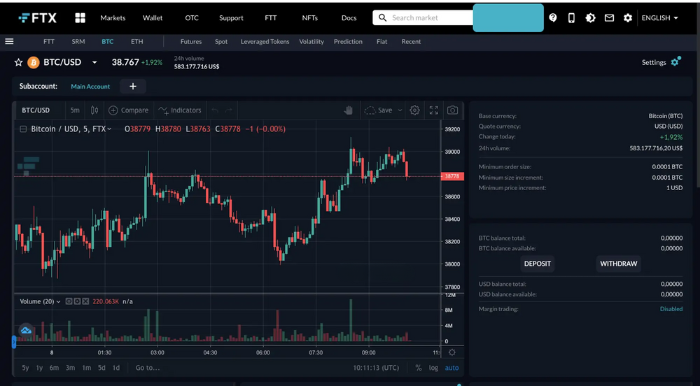
Below the chart, you will find the Order Books section and the order placement section. Trading on FTX is fairly simple. However, you need to pay attention to the Order Type to make the correct selection.
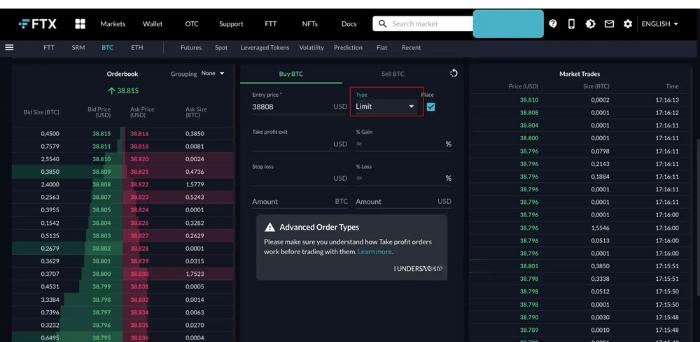
Here, it can be simply divided into market orders and limit orders. In simple terms, a market order is an order that will be executed immediately at the current market price. A limit order, on the other hand, is activated when the price reaches a certain level you’ve set beforehand. At that point, the order will be placed in the Order Books and wait to be matched.
When looking at the types of orders, you might think that buying coins on FTX or trading on FTX is quite complex. However, if you understand the basics through the guide on trading on FTX, you will find it extremely simple.
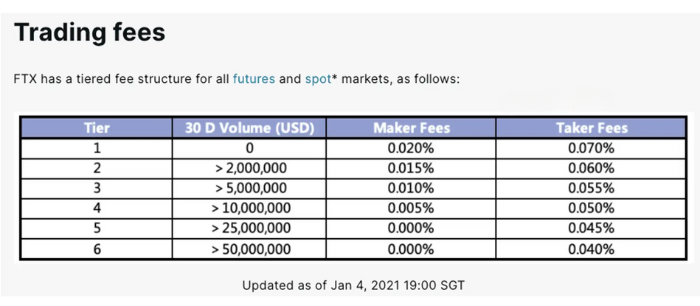
Below is the FTX trading fee table:
4. IS FTX A SCAM OR SAFE?
It can be said that FTX exchange has high-security standards for both FTX Global and FTX US. As of now, there have been no reported incidents or user complaints regarding security breaches or data hacks.
FTX requires users to enable two-factor authentication (2FA) using two recommended apps: Google Authenticator or Authy. The default 2FA method will be an SMS sent to the phone number you provided, which you can change in the Settings -> Security section. FTX also allows you to request 2FA and a separate password for all withdrawal transactions on your account.
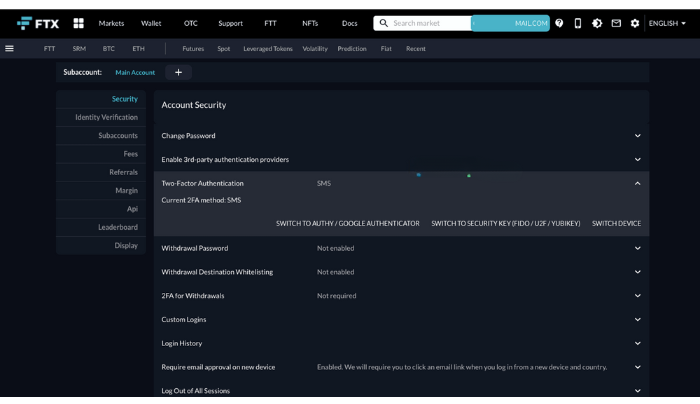
Note: After changing your two-factor authentication method, FTX will not allow you to withdraw funds for 24 hours.
5. CONCLUSION
FTX is still known as one of the only cryptocurrency derivatives exchanges that offers leverage for traders. Although FTX is considered a relatively young cryptocurrency exchange in terms of its founding years, it has made a significant impact on the crypto market.
With today’s article about FTX exchange, we hope you have gained more information about this cryptocurrency exchange. You should also now know how to complete KYC on FTX, how to buy coins on FTX, and most importantly, feel more assured about whether FTX is a scam or safe.
- t.me/finance_solutes
- Website: https://finance-solutes.com
- Hotline: +1 929 5636 439 ( Hotline )
- 26 Broadway, Suite 934, New York, 10004, US
