
 XM
XM Bybit
Bybit Binance
 IC Markets
 Pepperstone
 OKX
OKX Vantage
 VT Markets
 BingX
BingX Gate.io
 Kucoin
 MEXC
MEXC Exness
 Bitget
BscScan is known as the premier blockchain explorer for the Binance Smart Chain network. In addition to tracking transactions, verifying smart contracts, and offering numerous other features, BscScan also serves as the top validator for BSC.
In our previous article, Forex explored the Etherscan tool with you. Today, let’s dive into understanding what BscScan is and how to use its features for crypto investments!
Let’s get started!!!
1. OVERVIEW OF WHAT BSCSCAN IS
In the first part of this article, let’s explore what BscScan is and explain why investors should use BscScan instead of other explorers.
1.1. What is BscScan?
BscScan is a blockchain explorer specifically designed for the Binance Smart Chain (BSC) network. With this tool, you can explore and search for a range of information on the Binance Blockchain, such as wallet addresses, tokens, transactions, gas fees, and more.
In fact, BscScan was developed by the same team behind Etherscan. Therefore, both explorers share similar definitions and functionalities. Additionally, BscScan supports both Mainnet and Testnet versions.
In simple terms, what Etherscan can do, BscScan can do similarly.

1.2. Why Should You Use BscScan Instead of Other Explorers?
As mentioned earlier, BscScan comes from the same team behind Etherscan. If you’re familiar with Etherscan, you’ll definitely appreciate the BscScan interface, as it maintains a user experience very similar to Etherscan.
In addition to basic features, BscScan also provides users with advanced tools to help with data searching or investment activities, among others.
Practical Example:
Users can look up a Smart Contract on BscScan or check whether these smart contracts have been verified.
Moreover, you can set up Whale Alerts to track large transactions. In some cases, when a significant amount of BNB is transferred to an exchange, it signals that a buying or selling event might be about to happen.
2. PROS AND CONS OF BSCSCAN
So, what are the advantages and limitations of the BscScan tool that we should be aware of?
2.1. Strengths of BscScan
- BscScan is the leading blockchain explorer tool for Binance Smart Chain (BSC), built by the same development team behind Etherscan. Therefore, you can trust the tool’s credibility and user experience.
- All information on BscScan is transparent and publicly available, as it doesn’t function like a wallet and lacks the capability to manage a portfolio. This means you can be assured that your personal information is secure.
- Users can track information clearly and quickly, allowing them to predict fluctuations in the digital currency market.
For those using DApps, knowing how to use BscScan is a great advantage. Investors can verify whether Smart Contracts are verified, and even interact directly if the DApp’s API Key encounters issues. Additionally, on-chain data will always be updated accurately for investors.

2.2. Limitations of BscScan
Despite being highly rated by the investor community, BscScan still hasn’t fully addressed some limitations. This leads to a few drawbacks that may cause dissatisfaction among users, such as:
- For new users, the tool can feel overwhelming due to the large amount of information displayed immediately upon accessing the main interface.
- You need to register an account to use more advanced and enhanced features.
3. DETAILED GUIDE ON USING BSCSCAN FOR NEW TRADERS
There are many features to familiarize yourself with when using the BscScan tool. First, you need to visit the website https://bscscan.com/, and the main interface will appear.
3.1. Overview of the Main Interface of BscScan
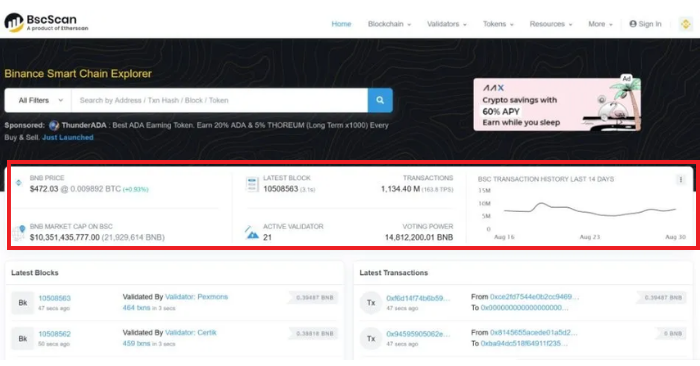
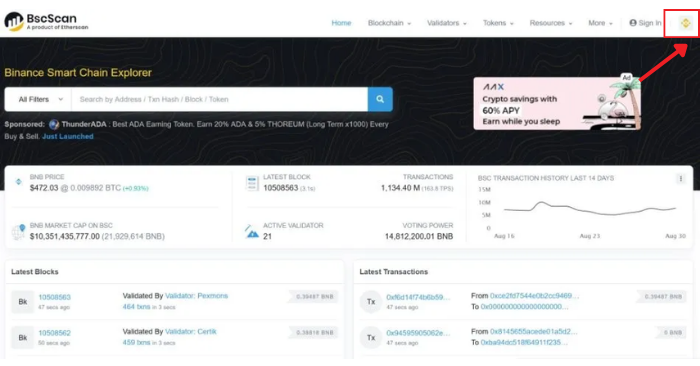
The image above shows the main interface of BscScan. This tool displays information related to BNB, such as: price, market capitalization, voting power, validators, and more. Here’s a breakdown of the key sections:
- BNB Price: The tool displays the current price of BNB in USD.
- Transactions: Displays the transaction ledger of confirmed transactions within the last 24 hours.
- BSC Transaction History (Last 14 days): Shows the transaction volume carried out by investors over the past 14 days.
- Latest Block: Displays the latest block with various transactions that are being approved and validated within the block.
3.2. Switching Between Mainnet and Testnet on BscScan
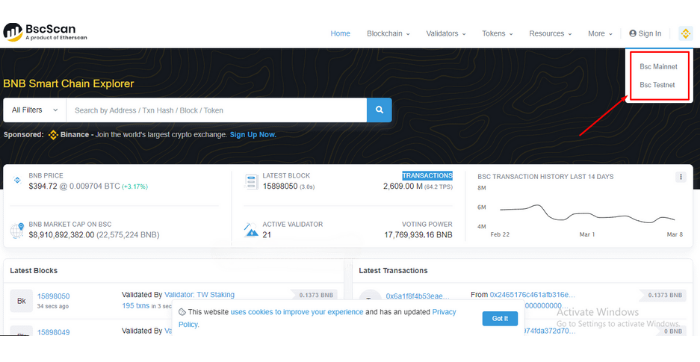
To switch between Mainnet and Testnet on BscScan, follow these steps:
Step 1: Visit the BscScan website here, and click on the Binance icon at the top right corner of the screen.
Step 2: Select Mainnet or Testnet to use Bsc Scan tool
3.3. Read information from Binance wallet address
In this section, Forex will take an example of a specific wallet address: 0xe4E2fE2dA648aedb4B06F0829B8D2C4a01B12D80
You perform the following steps:
Step 1: Copy and paste the wallet address into the search box, then click Search
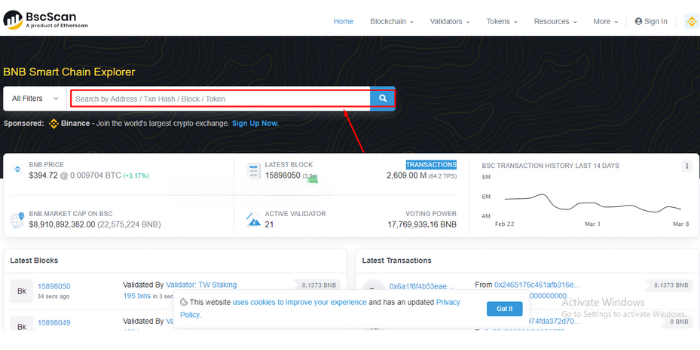
Step 2: The results will appear as shown below and you can exploit the information you need.
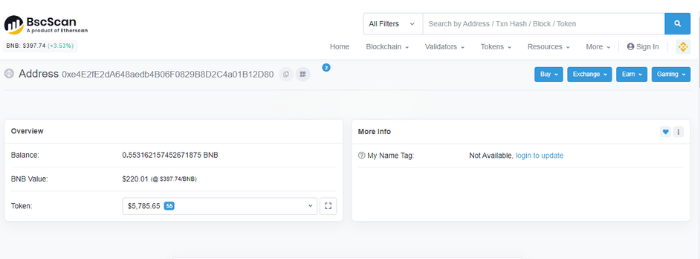
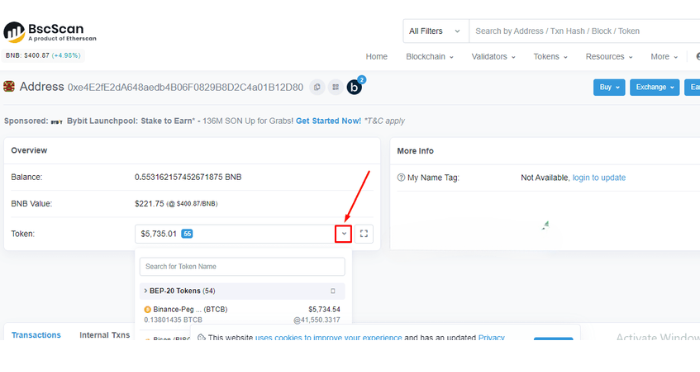
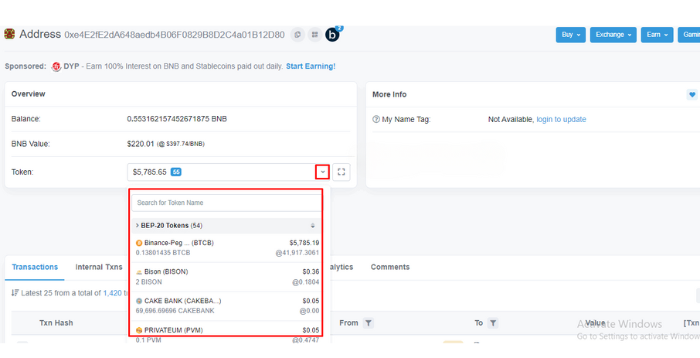
In the image above, you need to pay attention to the following information:
- Balance: Shows the amount of BNB tokens in the wallet
- BNB Value: Shows the balance in the wallet in USD units
- Token: List of tokens in the Binance wallet
Note: You can click on the icon that Forex has circled in red below to see the extended list of tokens.
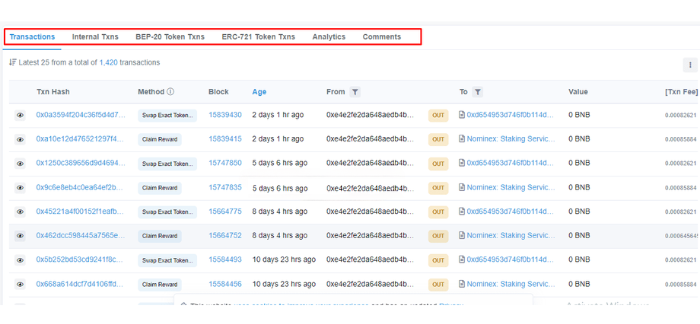
In addition, you should also check out some other important information as follows:
- Transaction: A list of transactions that have been made in the wallet.
- Internal Txns: Internal transactions.
- BEP-20 Token Txns: Transactions made with BEP-20 tokens.
- ERC-721 Token Txns: Transactions made with ERC-721 tokens.
- Analytics: Statistics and charts related to transactions and wallet balances.
- Comments: Displays comments from BscScan accounts.
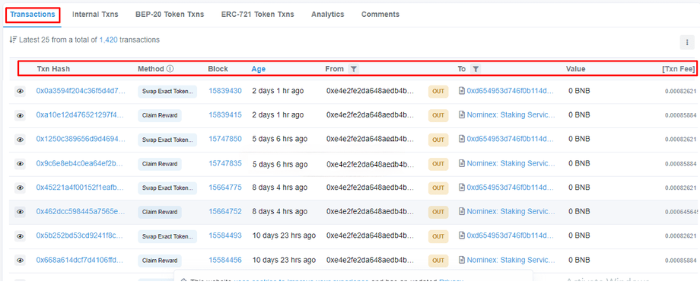
Additionally, you should pay attention to the detailed information displayed under the Transaction section, which includes:
- Txn Hash: The transaction hash, where each transaction has a unique code.
- Block: The block location where the transaction was processed.
- Age: The timestamp of when the transaction took place.
- From: The sending wallet address.
- To: The receiving wallet address.
- Value: The transaction volume.
- Tx Fee: The fee that the sender must pay for a successful transaction.
3.4. Checking BNB Transactions
To look up transactions on BSC, users need the following information:
- Txn Hash: The BNB transaction hash, which is displayed as a long string of numbers and characters.
- Sender Address: The Binance wallet address of the sender.
- Receiver Address: The Binance wallet address of the receiver.
3.5. Checking BEP-20 Wallet Balance
Follow these steps:
Step 1: Go back to the wallet address information page that you want to check the balance for.
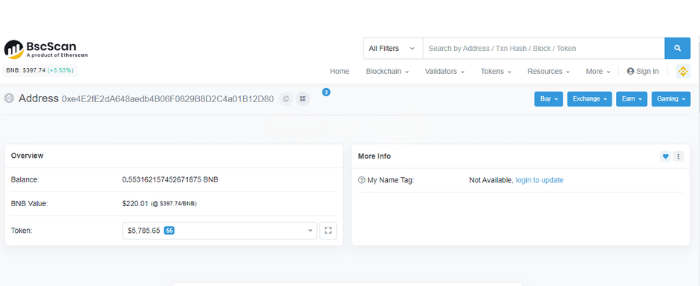
Step 2: At Token, click on the down arrow icon. The interface will then display the BEP-20 wallet balance you need to find.
3.6. Track information on decentralized exchanges DEX
Step 1: You access HERE.
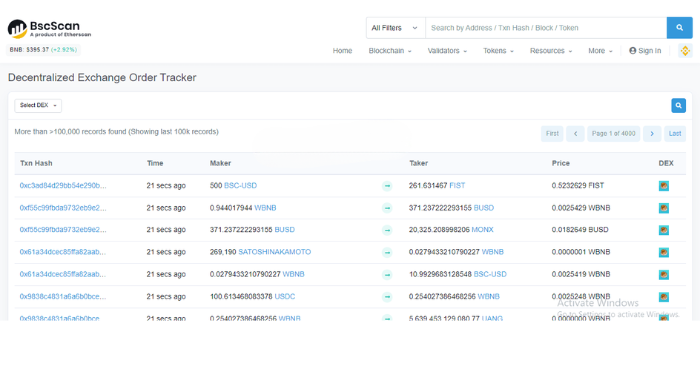
Step 2: By clicking on Select DEX, users can track parameters representing the number of transactions on each exchange, thereby seeing which DEX exchanges are being prioritized by investors and have the highest potential for use.
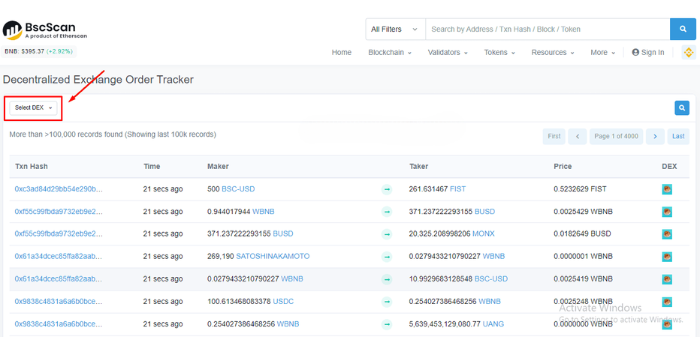
Step 3: Select a DEX exchange whose information you want to look up
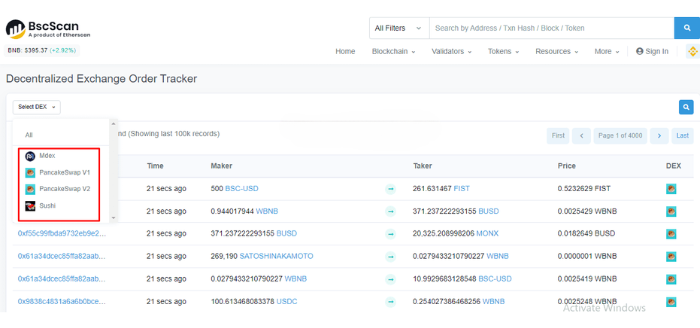
So you can check the parameters related to a DEX floor and know whether that floor is preferred by many investors or not.
4. SUMMARY
Above, Forex has provided full detailed information about what BscScan is, the advantages and disadvantages of BscScan, as well as how to use this tool in the most detailed way for both newbies and experienced in cryptocurrency trading. Hopefully, with what we have just shared, you have had the most general overview, and at the same time know how to exploit BscScan to serve your investment process.
If you have any questions about this topic, please comment below, Forex will answer you immediately.
Wish you success in your trading career!!!
- t.me/finance_solutes
- Website: https://finance-solutes.com
- Hotline: +1 929 5636 439 ( Hotline )
- 26 Broadway, Suite 934, New York, 10004, US
