
 XM
XM Bybit
Bybit Binance
 Robinhood
 Webull
 IC Markets
 Pepperstone
 OKX
OKX Vantage
 VT Markets
 BingX
BingX Gate.io
 Kucoin
 MEXC
MEXC Exness
 Bitget
Trust Wallet – an outstanding e-wallet solution trusted by most traders and investors in the crypto market. Details about what a trust wallet is, what a trust wallet is for, how to create a trust wallet, instructions on how to use a trust wallet and reviews of whether a trust wallet is a scam or trustworthy will be made clear and detailed in today’s article.
1. WHAT IS TRUST WALLET?
Trust Wallet is a decentralized online cryptocurrency wallet that supports over 160 types of cryptocurrencies, assets, and blockchains. It is considered one of the best types of digital wallets available today. Initially, Trust Wallet was designed to only support ERC20 and ERC223 network tokens, but it has since been developed to support many other types of cryptocurrencies.
Trust Wallet was founded by Viktor Radchenko, a software developer from Ukraine. The Trust Wallet project started in 2017, and its functionality with ERC20 standard tokens attracted thousands of users from around the world. The user-friendly interface of the Trust Wallet app has contributed to its growing popularity. In 2018, Binance acquired the Trust Wallet project along with its parent company.
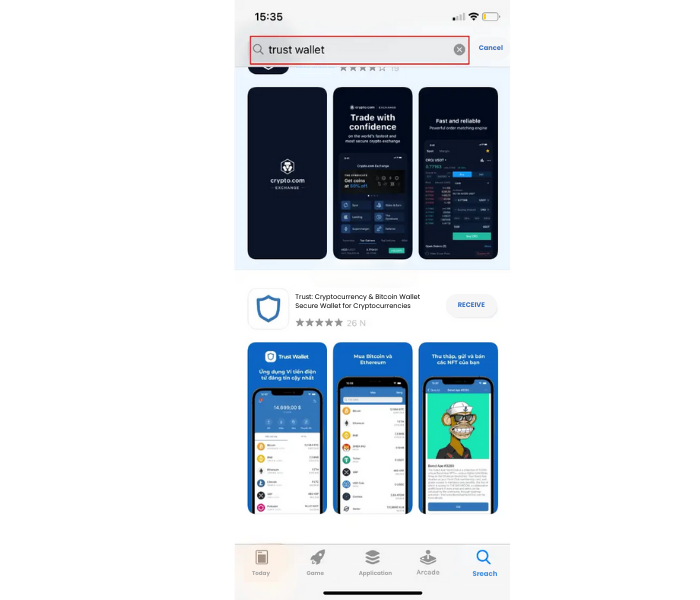
You can download Trust Wallet completely for free on Google Play or the App Store. The process of installing Trust Wallet is very simple: just search for “Trust Wallet” in the search bar, and you will get results like this. Then, just click to download Trust Wallet. You won’t incur any fees when downloading or registering your Trust Wallet.
1.1. What is Trust Wallet DApp? How to install DApp on Trust Wallet iOS
Trust Wallet DApp is a Web3 browser that allows users to interact directly with any decentralized application (dApp) from this wallet. With this, users do not need to exit the app or transfer funds into dApps.
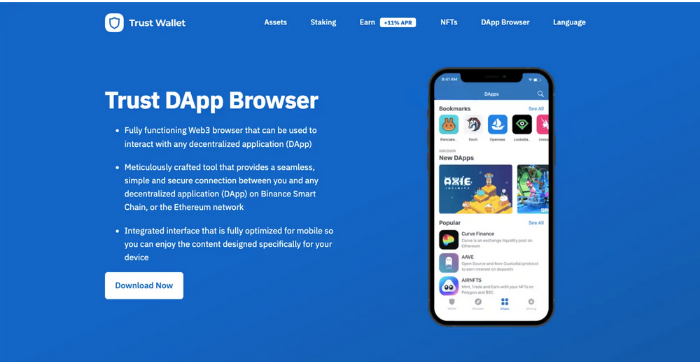
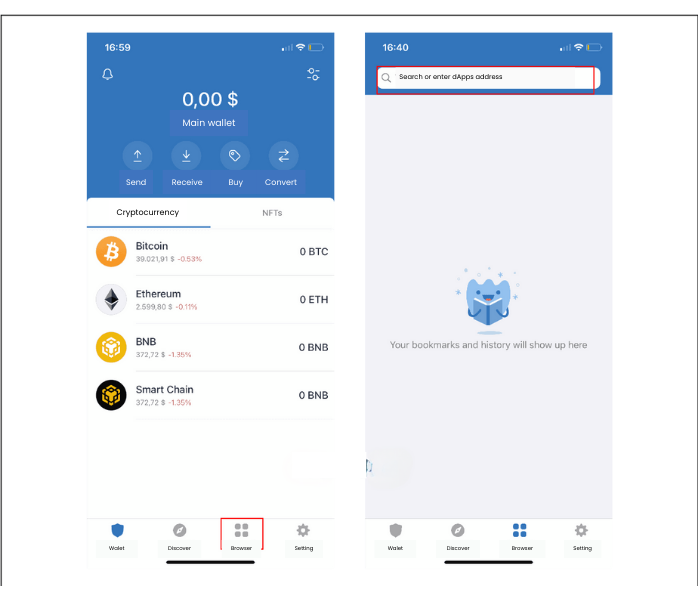
Currently, the Trust Wallet dApp is limited to the two largest smart contract ecosystems, Ethereum and Binance Smart Chain. After being tested and optimized, the application will be integrated into the Web3 browser of Trust Wallet. All you need to do to open a dApp on Trust Wallet is to search for and connect to the dApp you want, such as Uniswap.
1.2. Key Features of Trust Wallet
Trust Wallet allows you to trade various cryptocurrencies securely. Let’s explore the core features of Trust Wallet below!
– Send/Receive Coins: This is the main function and perhaps the most important feature of digital wallets. Traders can transact directly on Trust Wallet, and in addition to sending and receiving coins from other Trust Wallet users, traders can also buy coins within Trust Wallet.
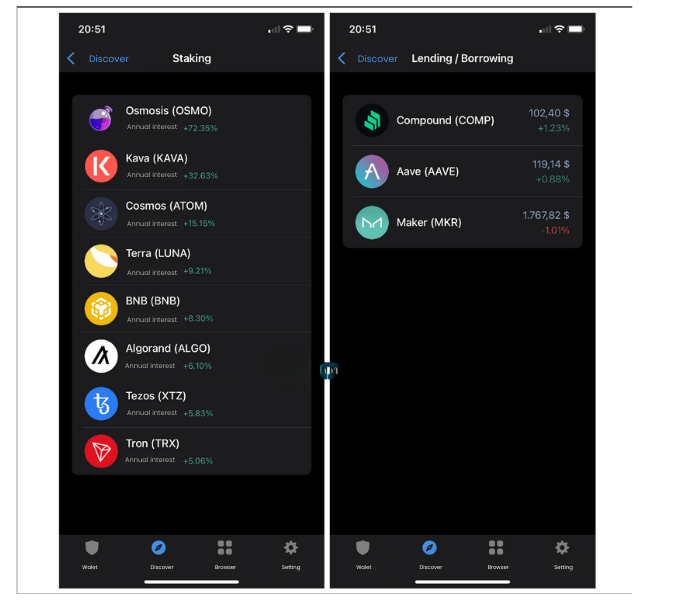
– Staking + Lending/Borrowing: Traders can earn money on Trust Wallet through Staking or Lending. These earning features are located in the “Explore” section of the app. Depending on the time, there may be opportunities to earn very high annual returns that traders can take advantage of.
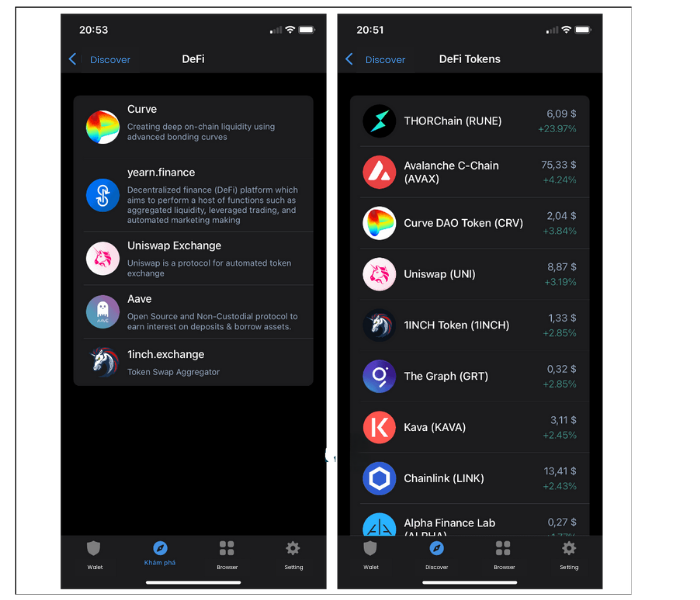
– DeFi: You can provide liquidity for a yield farming transaction like Yearn Finance, or engage in exchange trading on decentralized exchanges (DEX).
1.3. Trust Wallet Fees
In fact, Trust Wallet does not charge any hidden fees from users. However, you will still have to pay transaction fees to complete your transactions. Trust Wallet fees are divided into two types:
– Trust Wallet Network Fees: This fee is charged to reward the miners in the Proof of Stake system within the blockchain. Network fees depend on how quickly you want your transaction to be processed and the market trends.
– Gas Fees: Those who have traded in blockchain ecosystems are somewhat familiar with this type of fee. To validate cryptocurrency blocks, you will need to pay a gas fee. In the Ethereum blockchain, gas fees are typically calculated in Gwei.
2. HOW TO CREATE A TRUST WALLET
To use the features of Trust Wallet, the first step is to create an online wallet after downloading Trust Wallet from app stores.
2.1. How to Create a Trust Wallet on a Computer
One of the drawbacks or limitations of Trust Wallet is that it currently does not support a desktop version.
As of now, there is no Trust Wallet for Chrome extension. When searching for how to download or set up Trust Wallet on a computer, you won’t find any guides, as the Trust Wallet app is only available for mobile devices.
2.2. Creating a Trust Wallet on Mobile
Step 1: You need to download the electronic wallet from the app stores. Trust Wallet supports both Android and iOS.
Step 2: After downloading the cryptocurrency wallet, open the app. Select “Create New Wallet” to register your Trust Wallet. The registration is completely free. If you already have a Trust Wallet, click “I already have a wallet” to log in to Trust Wallet.
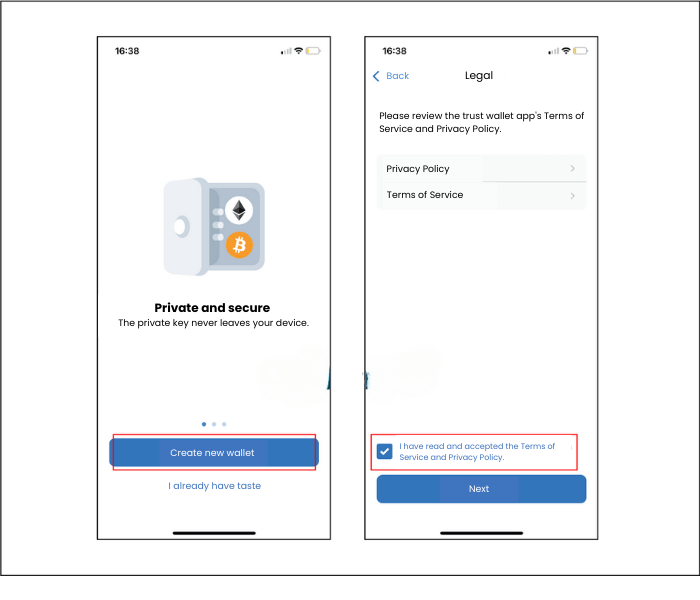
Step 3: Read the security policies and terms of service. Then, check the box “I have read and accept the terms of service and privacy policy,” and click continue.
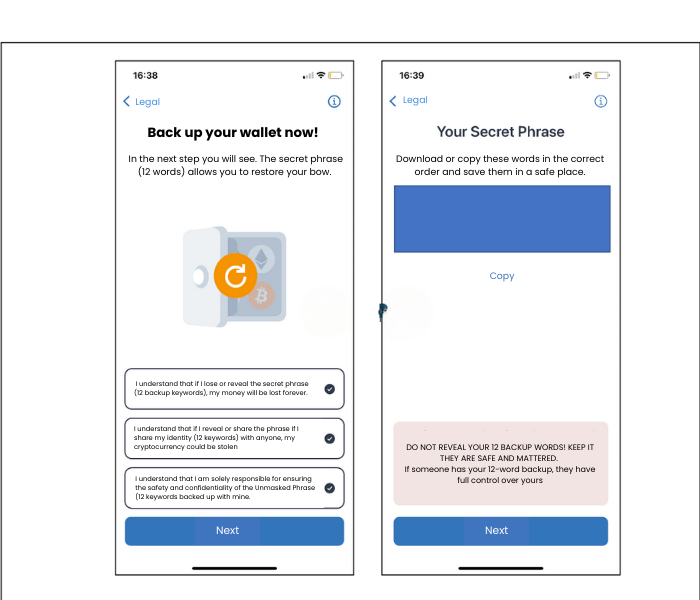
Step 4: Backup your Trust Wallet key. These are the secret keys that allow you to recover your Trust Wallet. Note: Store them carefully and avoid letting anyone else know these 12 keys, as anyone who possesses these keys can restore your Trust Wallet.
Step 5: After clicking “Continue,” you will need to select the keys in the order that Trust Wallet provided to you, and this will complete your Trust Wallet registration.
3. HOW TO USE TRUST WALLET
As mentioned above, the interface of the Trust Wallet app is simple and user-friendly, making it easy to use Trust Wallet or purchase coins on Trust Wallet. Additionally, Trust Wallet supports the Vietnamese language, so traders who are not very proficient in English won’t face many difficulties.
3.1. How to Get Your Trust Wallet Address?
To receive coins or tokens from another address, you need to know how to get your Trust Wallet address. So, where is the wallet address? First, when you access the main page of the app, you will see options like “Send,” “Receive,” “Buy,” and “Swap” beneath your balance.
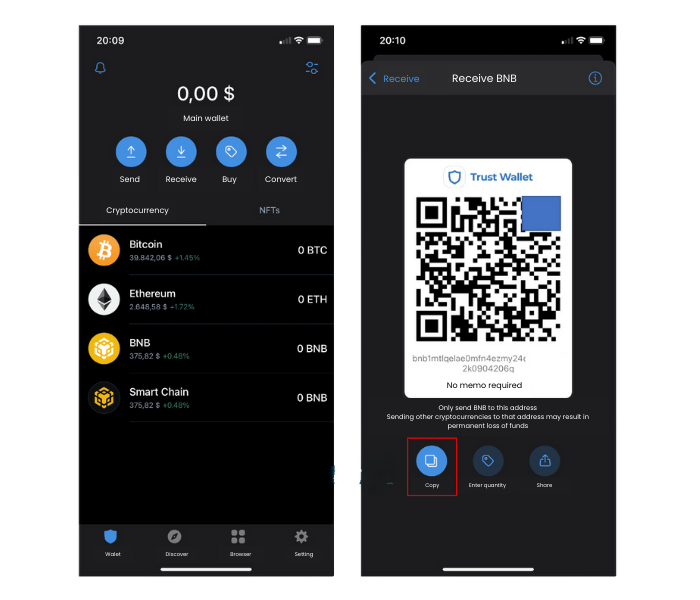
Select “Receive,” and the system will display a list of supported cryptocurrencies. You can click on the cryptocurrency you want to transact with. At this point, a QR code and a string of numbers will appear, which is the Trust Wallet address for that cryptocurrency.
Alternatively, on the main screen of this electronic wallet, there is also a list of coins. By clicking on “Receive,” the Trust Wallet address for that coin will appear. You can also add tokens to your Trust Wallet. To do this, follow the steps below to add a token to your Trust Wallet:
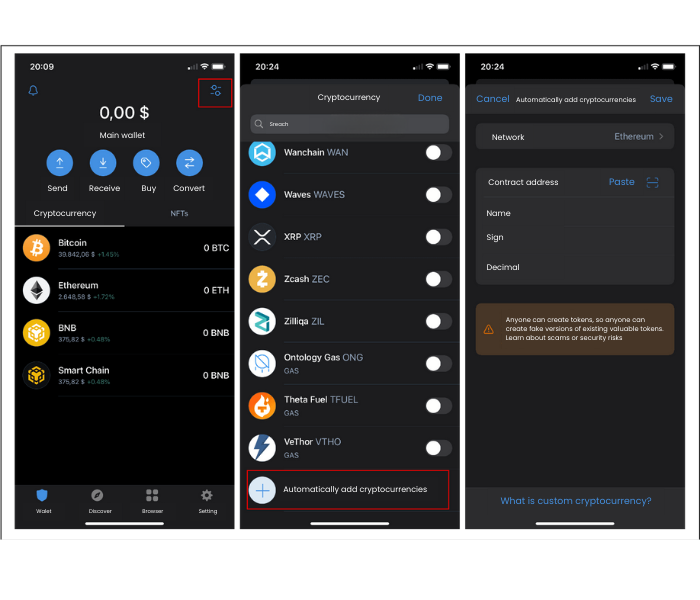
3.2. How to Deposit Money into Trust Wallet
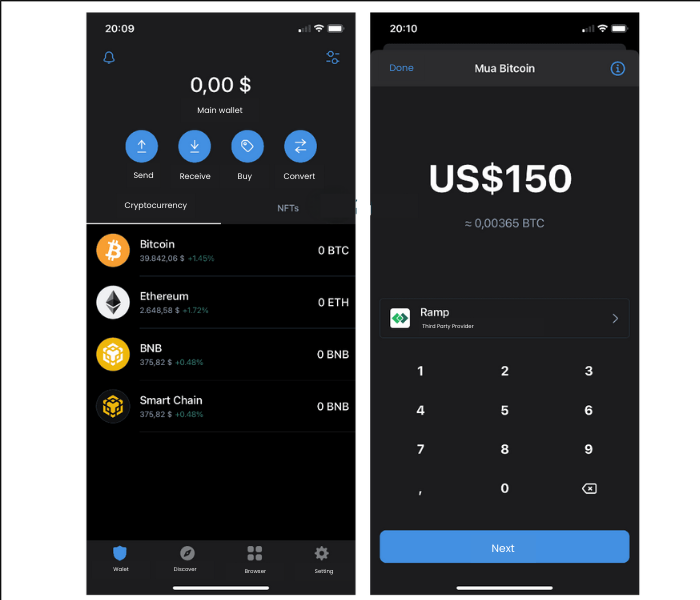
You can deposit coins directly by purchasing tokens within the Trust Wallet app or transferring them from exchange wallets to your Trust Wallet. As explained in the previous section on how to get your Trust Wallet address, you will receive a receiving address for each digital currency. Copy that address or share the QR code with the sender.
The process of transferring money from Binance to Trust Wallet is similar to other digital wallets. Go to the trading wallet section on the exchange and select the coin you want to send. Then, choose Withdraw and paste your Trust Wallet address. Depending on the network, the time it takes to receive the Trust Wallet token may vary.
3.3. How to Withdraw Money from Trust Wallet
If you want to withdraw money from Trust Wallet to an exchange to sell tokens or coins, traders can select “Send” on the main screen. The system will then display a list of the coins and tokens you own. Select the type of token you want to withdraw from Trust Wallet.
If you’re concerned about making a mistake, you can select the coin you want to withdraw, go to the main interface of that token, and also select “Send.” Then, copy your exchange wallet address into the app and send the token.
4. IS TRUST WALLET SAFE?
When choosing an online wallet or a cryptocurrency wallet for storage, investors are likely to wonder whether Trust Wallet is a scam. First, it’s important to note that Trust Wallet is a software wallet, meaning it’s a digital wallet installed on your mobile device. It is not as secure as hardware wallets.
However, Trust Wallet is a non-custodial wallet, meaning they do not store any user information on their servers. The 12 keys provided during wallet registration are the only way to recover your Trust Wallet. If you lose or expose these secret keys, your Trust Wallet will no longer be safe, as anyone can restore your wallet and access it.
5. CONCLUSION
Trust Wallet is not just a regular cryptocurrency wallet. In addition to offering features for exchanging cryptocurrencies, it also provides opportunities to earn money from Trust Wallet for traders and investors. With this article on what Trust Wallet is, we hope you now know how to add tokens to Trust Wallet and how to transfer money from Binance to Trust Wallet.
Additionally, you now know how to check the BEP20 Trust Wallet address and ERC20 Trust Wallet address. Even if you don’t own any cryptocurrencies, you can still buy them directly through the wallet. And by now, you can probably answer for yourself whether Trust Wallet is a scam or if it’s a trustworthy wallet.
- t.me/finance_solutes
- Website: https://finance-solutes.com
- Hotline: +1 929 5636 439 ( Hotline )
- 26 Broadway, Suite 934, New York, 10004, US
