
 XM
XM Bybit
Bybit Binance
 Robinhood
 Webull
 IC Markets
 Pepperstone
 OKX
OKX Vantage
 VT Markets
 BingX
BingX Gate.io
 Kucoin
 MEXC
MEXC Exness
 Bitget
Volume Weighted Average Price (VWAP) is one of the most familiar indicators for most experienced investors. In addition, it is also a type of moving average that is quite different from the commonly used ones by traders. So, what is the Volume Weighted Average Price indicator? How can this indicator be used in trading? Let’s dive into the details with Finance Solutes in this in-depth forex knowledge article: Volume Weighted Average Price (VWAP): The No.1 Tool for Day Traders.
1. WHAT IS VOLUME-WEIGHTED AVERAGE PRICE (VWAP)?
In the first part, let’s explore the concept, characteristics, and significance of this special indicator with Finance Solutes.
Volume Weighted Average Price, commonly referred to in Vietnamese as the weighted average price line based on trading volume, is a technical analysis tool used to measure the average price weighted by volume. This indicator is often used on intraday timeframes as a means of determining the general price direction during the day.
The VWAP indicator is similar to a moving average and is primarily used by technical analysts to identify market trends.
1.1. Formula to Calculate Volume Weighted Average Price
You can calculate the VWAP using the following 5 steps:
- Step 1: Calculate the average of the high, low, and closing prices of each candlestick on any chosen timeframe (usually lower timeframes).
- Step 2: Multiply the result from step 1 by the current session’s trading volume.
- Step 3: Keep adding up these values until the end of the trading day.
- Step 4: Accumulate the trading volume throughout the day to calculate the total daily volume.
Step 5: Divide the value from step 3 by the value from step 4 to get the VWAP value.
In summary, the VWAP formula is as follows:
VWAP = ∑(Price * Volume) / ∑Volume
As you can see, the VWAP calculation formula is quite simple, easy to understand, and can be executed easily.
1.2. Characteristics of the VWAP Indicator
On a price chart, the VWAP indicator may look similar to a simple moving average (SMA). However, although they appear similar, each line represents a different value.
VWAP is calculated within a single day, whereas the SMA is calculated over a period and considers only the closing prices—not the volume. VWAP gives you a one-dimensional view to decide whether buying or selling positions should be prioritized in a trade. Additionally, this indicator also provides a summary view of a trade’s intraday performance.
As a result, retail traders use the VWAP indicator to evaluate an asset’s performance in a summarized format and assume potential trends and price patterns. At this point, they can make trading decisions and take positions accordingly.
1.3. What Does Volume Weighted Average Price Tell You?
Traders can use the VWAP indicator as a trend confirmation tool and build trading rules around it. For example, when the price is above the VWAP line, they may start long positions. Conversely, when the price is below the VWAP line, they may enter short positions.
As a trend indicator, VWAP adds more context to the moving average (MA). Since moving averages do not take volume into account, they can be misleading when it comes to price changes.

Moreover, moving averages are not always useful for short-term traders, as MAs require longer timeframes to provide accurate signals. VWAP is considered a short-term indicator because it relates to one data point per “tick” or per selected timeframe on the chart.
2. HOW TO DOWNLOAD AND INSTALL THE VWAP INDICATOR ON MT4 AND TRADINGVIEW
The Volume Weighted Average Price (VWAP) indicator is well worth adding to your trading toolkit. From the formula above, it’s clear that while the calculations are relatively simple, they can be time-consuming. If you dislike doing the math, don’t worry—most charting platforms will perform these calculations automatically for you. You just need to make sure you set them up correctly to use them effectively.
So how can you set up the VWAP indicator on the MT4 and TradingView trading platforms? In this section, Finance Solutes will guide you.
2.1. Setting Up the VWAP Indicator on MT4
To set up the VWAP Indicator on MT4, follow these steps:
Step 1: Download the VWAP indicator
Currently, the MT4 platform does not include the VWAP indicator by default. If you want to use it, you will need to manually install it on your MT4 platform. First, download the VWAP indicator for MT4 to your computer here:

Now that you have successfully downloaded the VWAP indicator to your computer, installing it is very simple; just follow the steps below:
Step 2: Open the MT4 software
After successfully downloading the VWAP indicator for MT4, extract the file. Then, open your MT4 software.
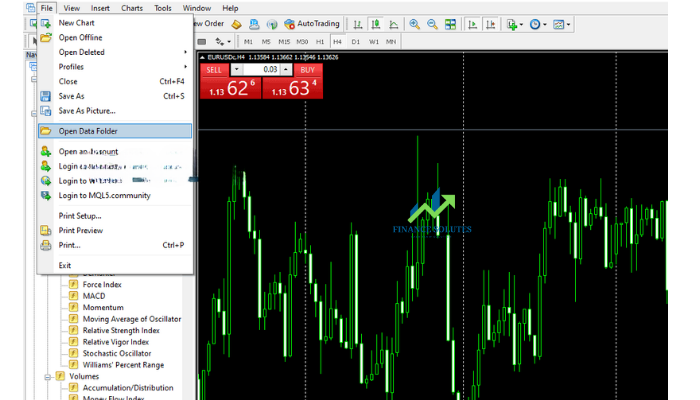
Step 3: On MT4, go to File => Open Data Folder
On the MT4 toolbar, click on “File,” then select “Open Data Folder.”
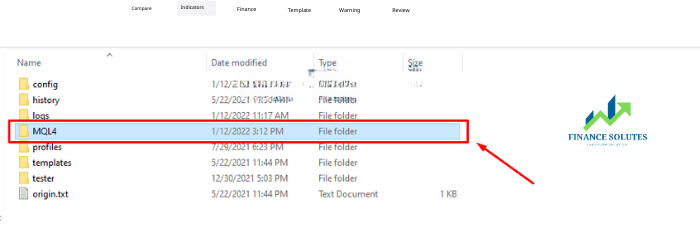
Step 4: Select MQL4
After selecting “Open Data Folder,” continue by choosing the MQL4 folder.
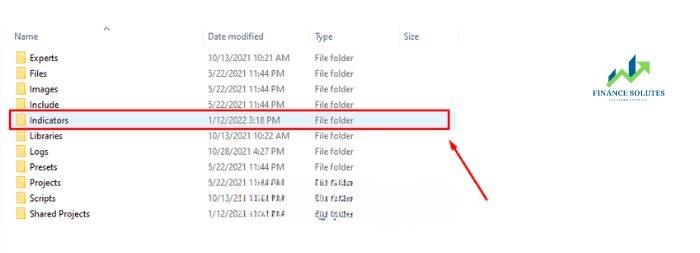
Then, copy the extracted VWAP indicator file you downloaded and paste it into the Indicators folder.
Step 5: Return to MT4 and select Navigators => Indicators
Go back to MT4, and in the Navigators panel, select Indicators.
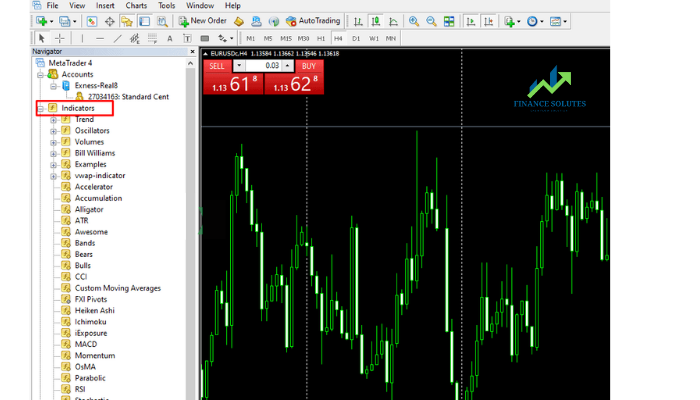
At this point, a list of indicators installed on the platform will appear. However, the VWAP indicator you just installed may not have updated yet.
At this stage, you have two options:
-
Close MT4 and reopen it. Then, go back to the Navigators panel and select Indicators → The VWAP indicator should now appear.
-
Right-click in the Navigators panel and select “Refresh” → The VWAP indicator should now be visible.
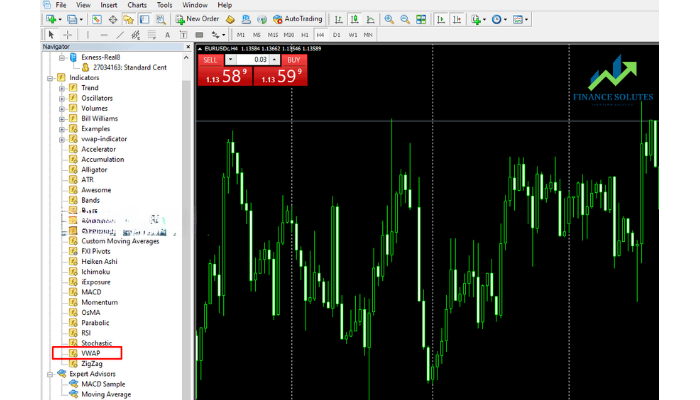
That’s it! You’ve successfully installed the VWAP indicator on your MT4 platform—super simple and easy, right?
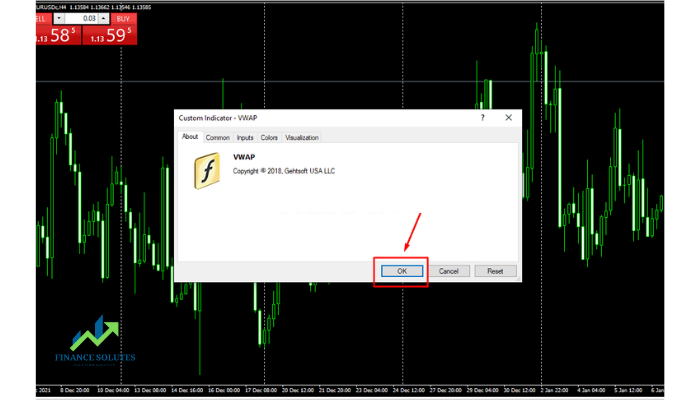
Next, if you want to use this technical indicator in your trading strategy, just select the VWAP indicator, then click OK.
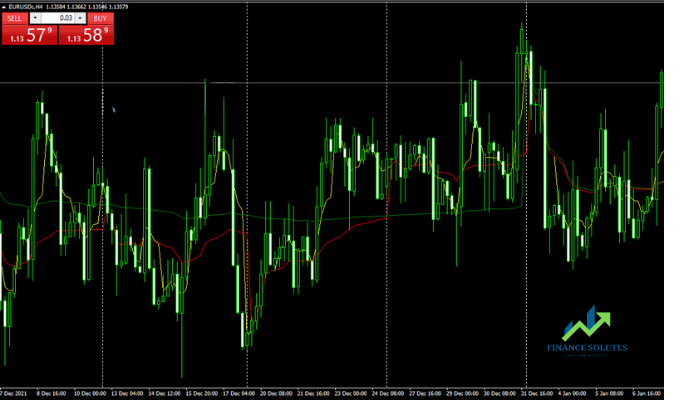
And here is an image of the Volume Weighted Average Price (VWAP) indicator displayed on MT4:
2.2. Setting Up the VWAP Indicator on TradingView
Setting up the VWAP indicator is also very simple. First, open the Chart interface on your TradingView platform, then follow these steps:
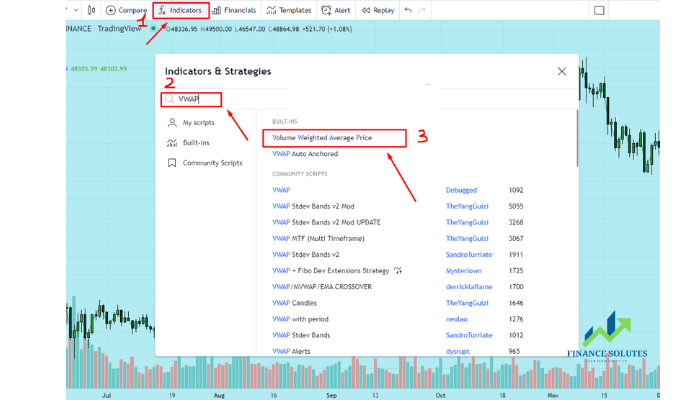
After adding the VWAP indicator, your chart will display like this:
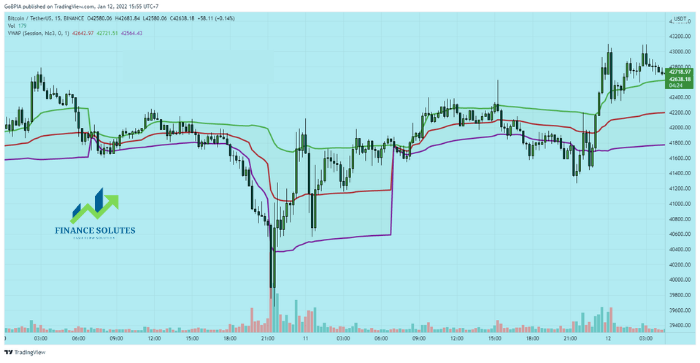
You have successfully set up the VWAP indicator on the TradingView platform.
Now, use the functions of this indicator and proceed with your trading strategy!!!
3. HOW TO USE THE VWAP INDICATOR IN TRADING
So how is the Volume Weighted Average Price (VWAP) indicator applied in trading?
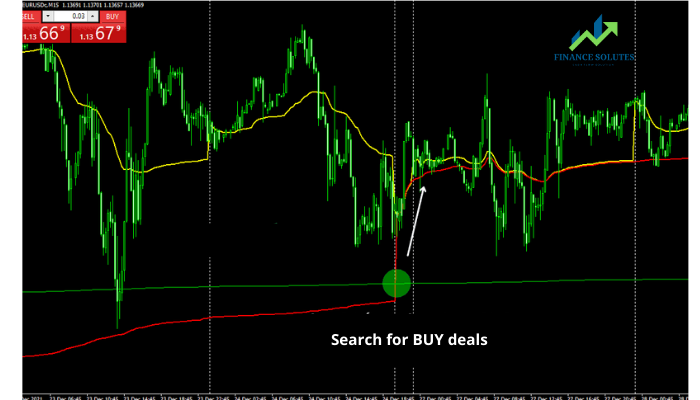
Buying with the VWAP Indicator
An uptrend is considered when the weekly line (red) crosses above the monthly line (green). At this point, you should only look for trading opportunities in the direction of the prevailing trend. In this case, it would be buy trades.
Although the VWAP indicator does not provide super-accurate entry points, it is a very useful method for finding entries when the price is below the daily line (yellow) and/or near the weekly line (red).
Place your Stop Loss below the previous swing low and set your Take Profit when the trade has a Risk:Reward ratio of at least 1:2.
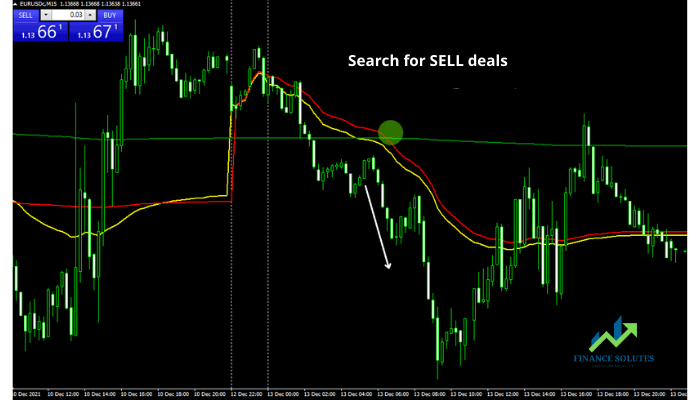
Selling with the VWAP Indicator
A downtrend is considered when the weekly line (red) moves below the monthly line (green). You should also only look for trading opportunities in the direction of the prevailing trend. In this case, it would be sell trades.
Although the VWAP indicator does not provide super-accurate entry points, it is a very useful method for finding entries when the price is above the daily line (yellow) and/or near the weekly line (red).
Place your Stop Loss above the previous swing high and set your Take Profit when the trade has a Risk:Reward ratio of at least 1:2.
4. SUMMARY
The Volume Weighted Average Price (VWAP) is one of the most interesting volume indicators because, unlike many other technical indicators, it is best suited for day trading. It is one of the most effective methods for determining intraday trends.
Above, we’ve covered the concept of the VWAP indicator, how to set it up on MT4 and TradingView, and how to use it in trading. We hope the information provided will assist you in your investment and trading journey.
We wish you success in your trading career!
- t.me/finance_solutes
- Website: https://finance-solutes.com
- Hotline: +1 929 5636 439 ( Hotline )
- 26 Broadway, Suite 934, New York, 10004, US
