
 XM
XM Bybit
Bybit Binance
 Robinhood
 Webull
 IC Markets
 Pepperstone
 OKX
OKX Vantage
 VT Markets
 BingX
BingX Gate.io
 Kucoin
 MEXC
MEXC Exness
 Bitget
If you have ever read Forex article about Stablecoins, you probably understand why USDT is always the first cryptocurrency most investors want to own before deciding to invest in any other coin. To continue the series of articles sharing knowledge about this currency, today Forex will guide new investors on two very simple ways to buy coins on Binance using USDT. Take a few minutes to follow along!
1. HOW TO OWN USDT
The first step to buying coins on Binance using USDT is, of course, owning USDT. As you may know, USDT and stablecoins, in general, serve as stable reserve assets and a medium of exchange to mitigate the extreme volatility of other cryptocurrencies. So, how can you own USDT?

Buying USDT is quite simple. You can refer to the P2P trading guide on Binance to purchase USDT using fiat currency or trade directly with a seller via their wallet address.
2. TWO WAYS TO BUY COINS ON BINANCE USING USDT
Here is a guide to buying coins on Binance with USDT. Note that the main difference between these two methods lies in the transaction fees, which Forex will explain in more detail in the following sections. After owning USDT in your Funding wallet (go to Wallet, then select Funding), you can transfer USDT to your Spot wallet (Spot Wallet) using the Transfer button.
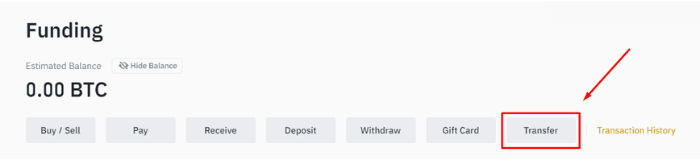
Once you have confirmed that USDT is in your Spot wallet, you can proceed to buy coins using USDT through one of the following two methods.
2.1. Buy Directly on the Exchange
The most popular way to buy coins on Binance using USDT is through Binance trading.
Step 1: Select Trade
After logging into your account and on the main interface, click on the Trade option in the toolbar. The screen will display as follows.
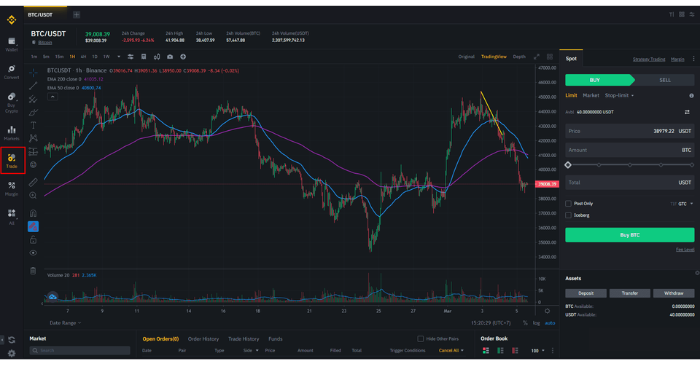
Step 2: Select the Trading Pair
On the top horizontal bar, select the trading pair. For example, if you want to buy Bitcoin with USDT, choose the pair BTC/USDT.
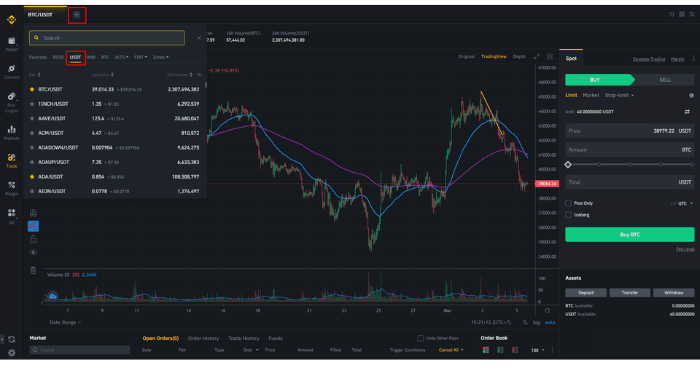
Click the plus sign on the right side of the trading pair, then you can enter in the search box or select the available USDT option, and the system will automatically filter trading pairs where USDT is the quoted currency.
Step 3: Place an order
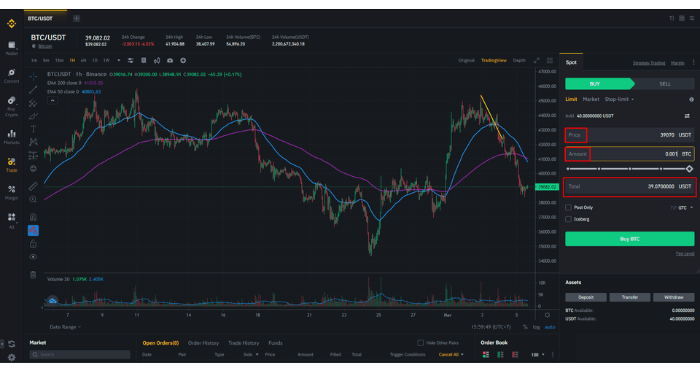
Once you’ve selected your desired trading pair, proceed to place a buy/sell order on the right side of the screen. In this case, the trading pair you selected is BTC/USDT, which means you want to buy BTC using USDT, so you’ll choose the Buy option.
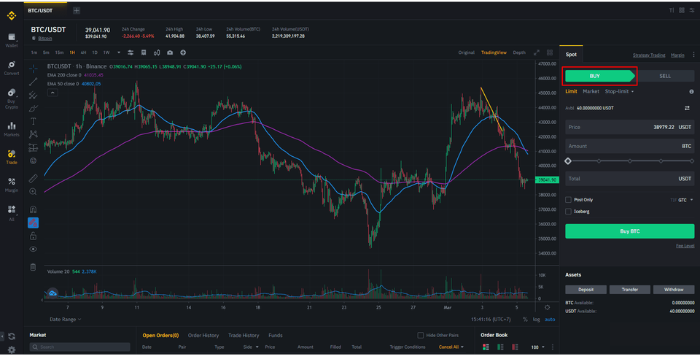
There are three types of orders you can choose from: Limit, Market, and Stop-limit, depending on your needs. In this article, TradaFX will guide you on how to place an order at the market price (Market).
The next step is to enter the amount. You have two options: Amount (the BTC volume you want to buy) or Total (the amount of USDT you want to use to buy BTC). Note a small drawback is that you can only enter up to two decimal places.
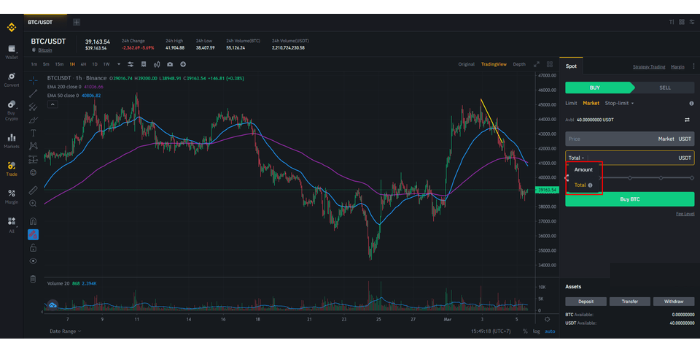
After entering the amount in the box, the system will not display a preview of the BTC volume you will receive or the USDT amount to be paid. Continue by selecting Buy BTC.
Tip: Switch your order from Market to Limit => Enter the market price of BTC/USDT from the chart into the Price field => Enter the estimated BTC volume into Amount => The system will calculate the total USDT you need to pay => Use this amount to go back and place the Market order.
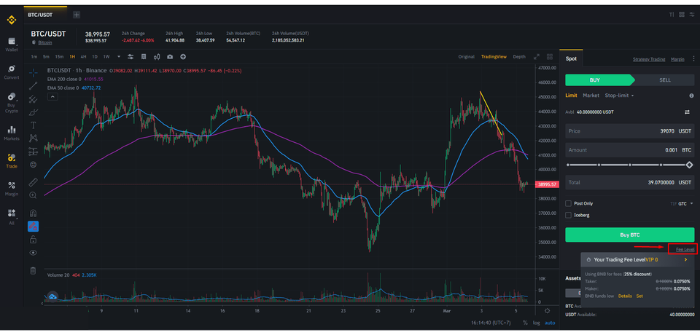
Note: With this type of transaction, your order will be charged a transaction fee. You can click on Fee level to see details.
In general, with this Fee Rate table, the transaction cost will depend on your account level (based on your trading volume and/or the amount of BNB you hold). The Taker fee is the percentage charged for market orders, and the Maker fee applies to limit orders.
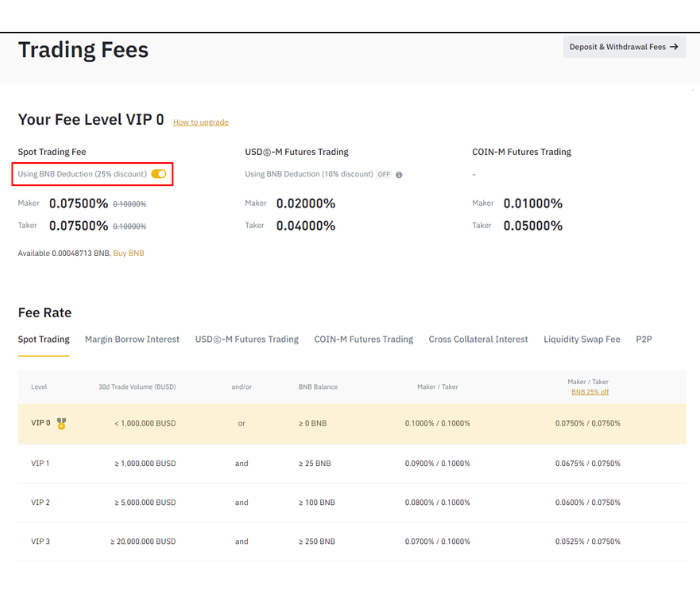
You will save 25% on transaction fees by turning on the option to pay with BNB, as shown in the example above. Additionally, Binance offers a 20% discount on transaction fees if you refer new users through the Refer Friends program.
2.2. Using the Convert Feature
The second way to buy coins with USDT on Binance is quite simple, and that is by using Binance’s Convert feature.
Step 1: Select the Convert option.
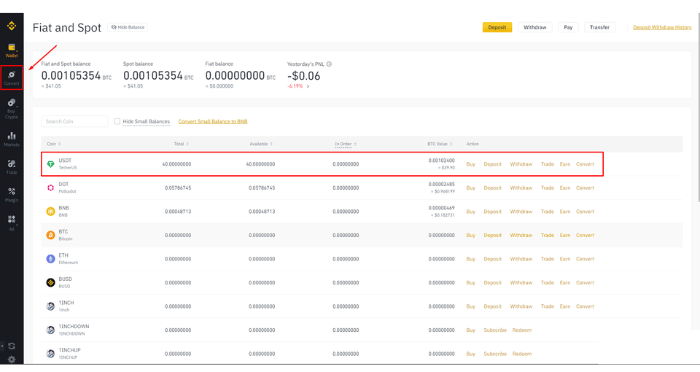
Convert & OTC Portal interface is as follows:
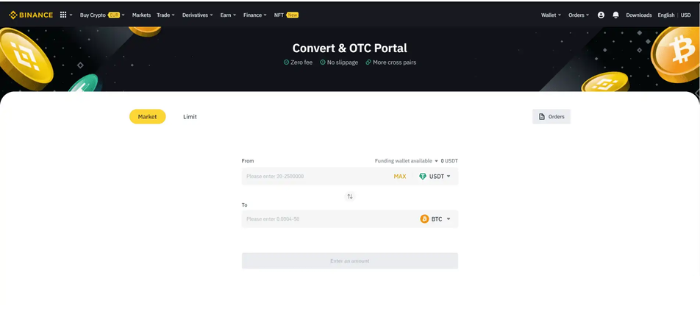
According to Binance’s description, the Convert feature has three notable characteristics: no transaction fees, no slippage, and it allows for a wider range of trading pairs. Additionally, you can perform the conversion using either a market order (Market) or a limit order (Limit). Here, Forex will guide you on how to convert using a Market order.
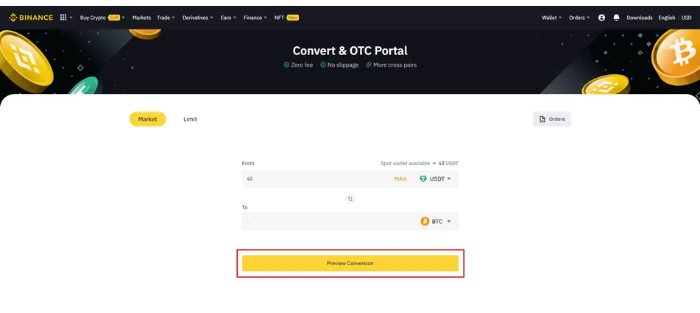
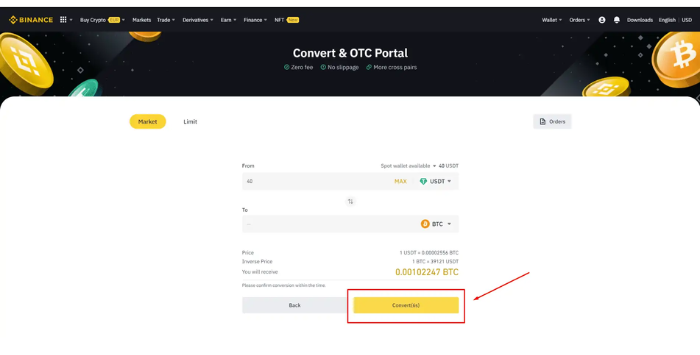
Step 2: Select the type of currency and enter the amount
Make sure to select a wallet that contains USDT first. You can choose either the Funding wallet or the Spot wallet.
- t.me/finance_solutes
- Website: https://finance-solutes.com
- Hotline: +1 929 5636 439 ( Hotline )
- 26 Broadway, Suite 934, New York, 10004, US
