
 XM
XM Bybit
Bybit Binance
 Robinhood
 Webull
 IC Markets
 Pepperstone
 OKX
OKX Vantage
 VT Markets
 BingX
BingX Gate.io
 Kucoin
 MEXC
MEXC Exness
 Bitget
ForexFactory (FF) is a tool that’s all too familiar to investors in Forex 101 trading. This is because it’s a website that provides incredibly valuable and useful information for making trading strategy decisions. Moreover, it’s also a place you’ll find yourself visiting thousands of times if you decide to pursue the “trader” path. However, for new traders, not everyone knows about this tool or how to use it.
Therefore, in today’s article, I’ll be guiding you on how to use the ForexFactory economic calendar.
Let’s get started!
1. WHAT IS FOREXFACTORY?
ForexFactory was founded and is operated by Fair Economy, Inc. – a company specializing in providing financial information services, with the aim of creating a dedicated forum for traders.
The Forex Factory Calendar is a financial hub, regarded by many traders as a “treasure” because it offers essential tools that every trader needs, such as: the economic calendar, news, brokers, and more.
Visit Forexfactory.com calendar.
And here is its main interface:
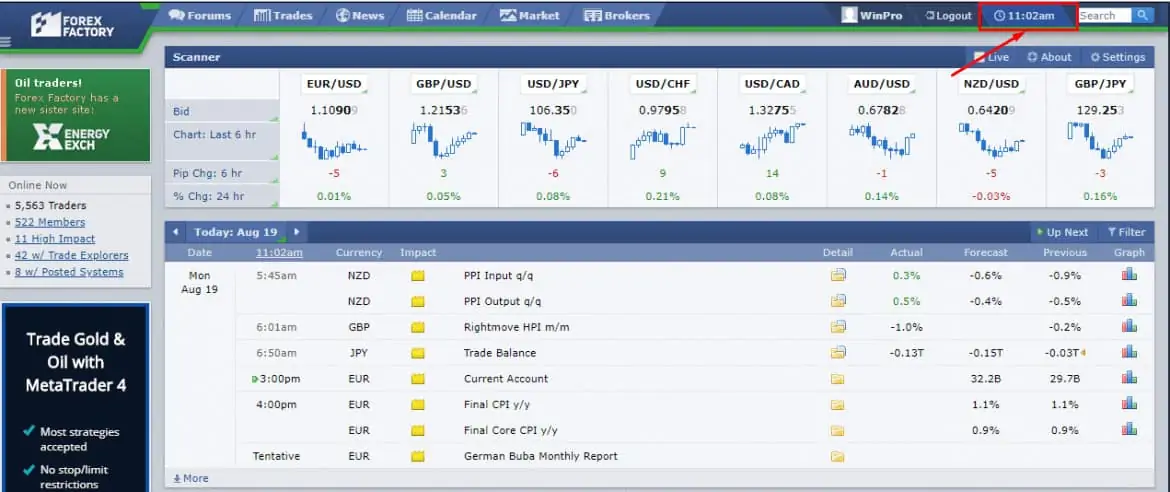
One of the key factors that make Forex Factory stand out compared to many other Forex websites is its highly flexible customization options. You can fully personalize all the information or set it up to display only what you’re most interested in, according to your specific needs.
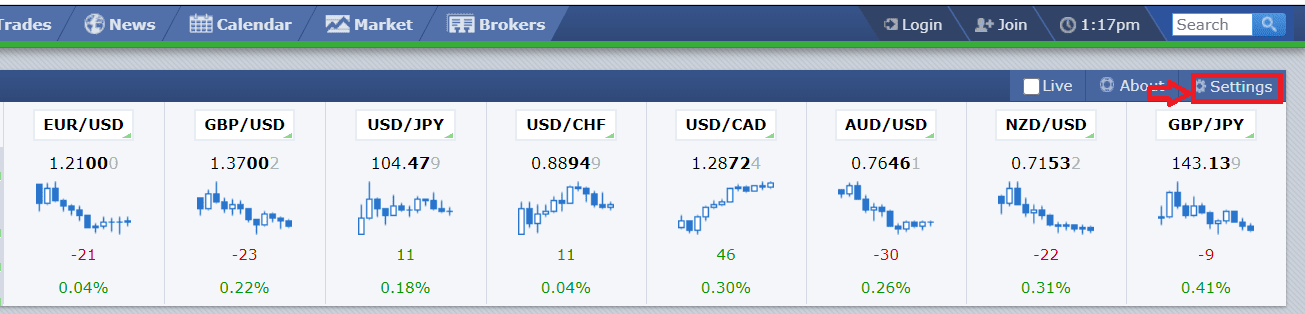
To customize, simply click on the Settings section on the right side or at the top of each category, where there’s a green dropdown arrow. Click there to adjust the information as you prefer.
Basically, this tool has three main sections you need to focus on: the Economic Calendar, News, and the Forum. Therefore, in this article, I’ll guide you through these three sections in the most detailed way, so you can use them to support your trading activities.
2. HOW TO USE THE FOREXFACTORY ECONOMIC CALENDAR
Although many websites offer a Forex economic calendar, hardly any can surpass ForexFactory. To access the economic calendar, the first thing you need to do is register a ForexFactory account.
Don’t worry — it’s super simple!
I’ll walk you through the process of using the ForexFactory economic calendar right now.
2.1. Register an account and adjust time zone
In fact, you can still view all the information on ForexFactory without an account. However, if you want to personalize the experience to fit your preferences, creating an account is a must.
To register an account, click on “Join”, then fill in the details as instructed below:
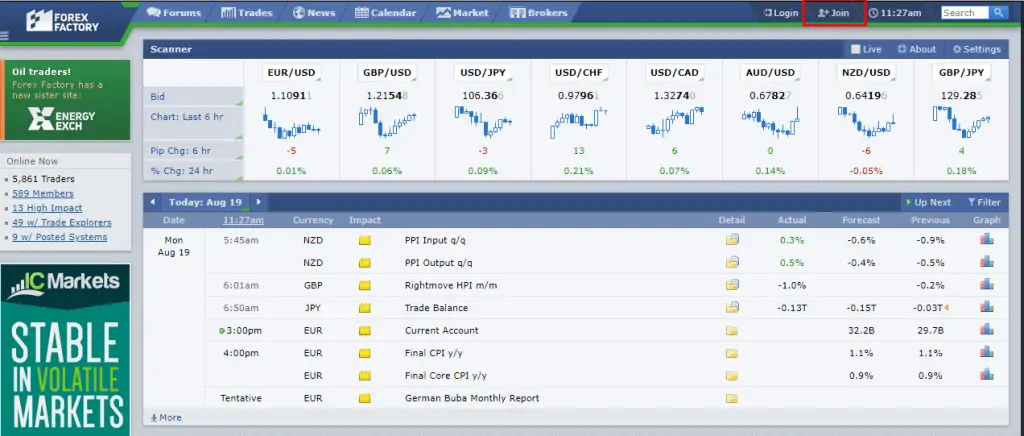
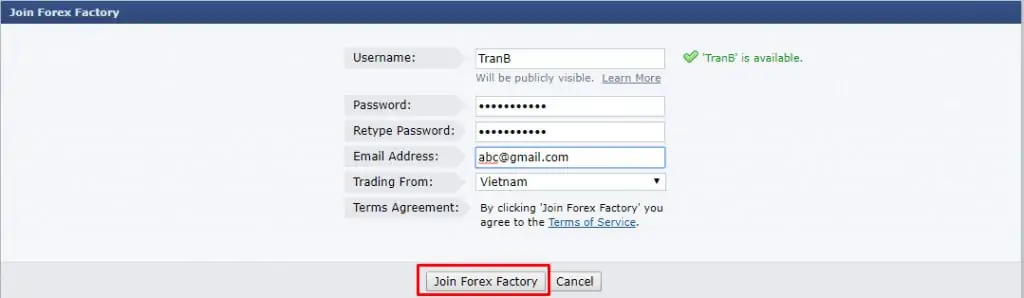
ForexFactory doesn’t require account verification. So, once you’ve completed the registration, simply click on “Login” to access your account.
After logging in successfully, check if the time displayed on ForexFactory matches your local time zone.
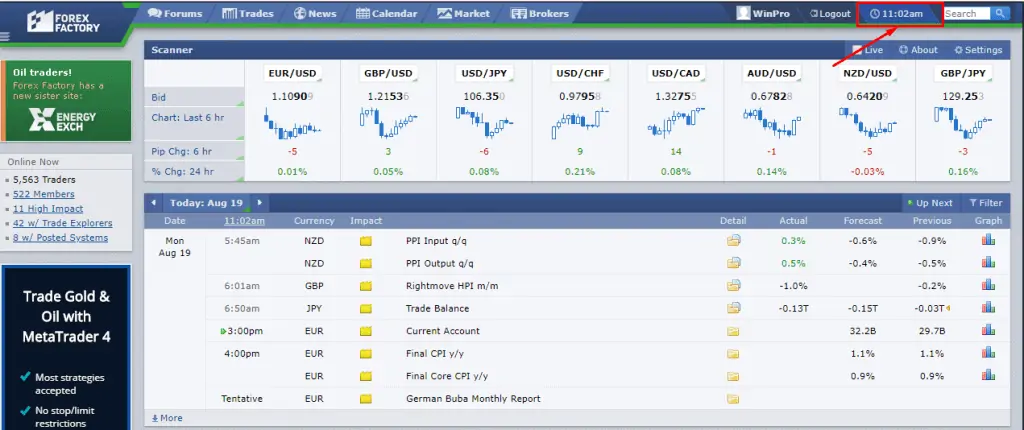
If the time zone doesn’t match, click on the time display, adjust it to the correct one, and then hit “Save Settings” — that’s it!
This time zone adjustment is extremely important. It helps you track the economic calendar in real-time. By default, ForexFactory uses GMT-5, so if you don’t set the correct time zone, you might easily get confused about the timing of upcoming economic events!
2.2. Economic Calendar
Once you’re done, look at the top toolbar and click on “Calendar”. The full economic calendar will appear:
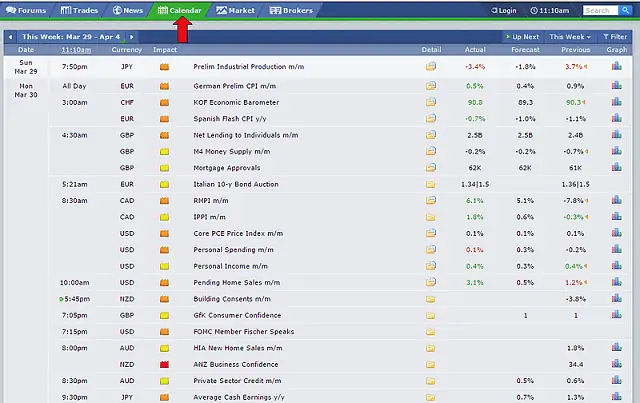
For many traders, checking economic information on ForexFactory is as essential as eating daily meals. Whether you’re the type who trades on the news or avoids it, staying informed is the top priority for every trader.
And here’s a truth that Tradafx wants to reveal to you:
When major news drops, almost all technical analysis becomes useless!
Here’s a real-life example:
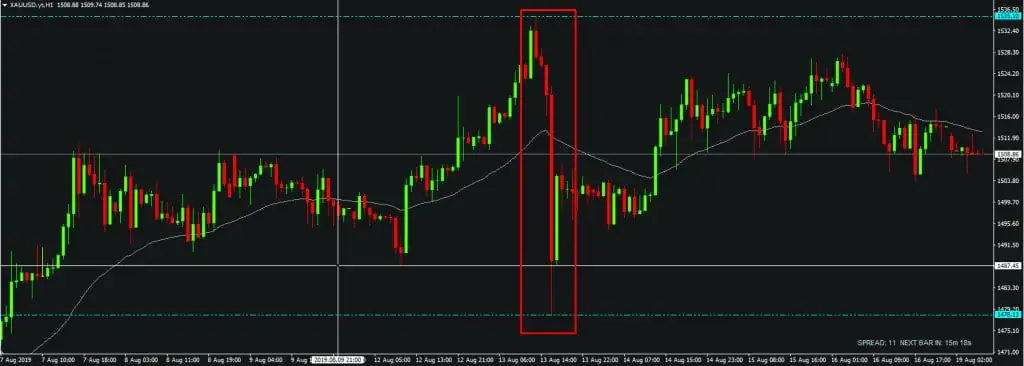
On August 13, 2019, gold plunged over 50 points, dropping from 1535 to 1478 in just over an hour, breaking through every technical analysis prediction. This happened right after a tweet from the U.S. President about the possibility of resuming negotiations in the U.S.-China trade war.
This is what I mean:
As you can see in the image above, many events happen in a single day. However, not every event is relevant or necessary for your Forex trading decisions.That’s why you should filter out unnecessary information using the Filter feature provided by ForexFactory. Simply click on the “Filter” button at the top, and a filter menu will appear with the following key options:
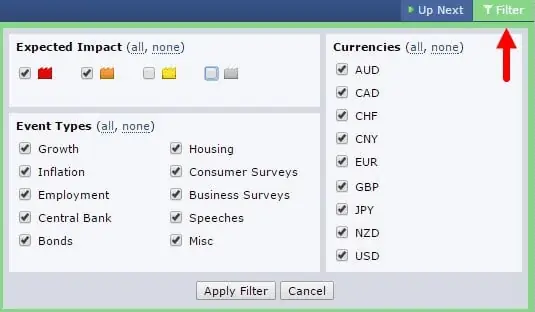
If you’re only interested in currencies like the U.S. Dollar (USD), Japanese Yen (JPY), or British Pound (GBP), you can deselect all other currencies by unchecking them.
You can also filter out low-impact news marked in gray and yellow, and focus only on high-impact events marked in orange and red, as these are more likely to affect your trades.
Not only can you track the timing of news releases, but ForexFactory also provides detailed insights into each event. Simply click on the folder icon next to each news item to access more information.
This tab shows you: previous results, how the news is measured, trading strategies based on the news, and explains why it matters. It even links to related articles for deeper insights.
2.3. Forex Factory Forum (Forums)
This is arguably the largest forum in the world for the 24-hour market. ForexFactory offers traders a platform to collaborate, discuss, and share effective trading strategies. What’s more, you’ll find tons of high-quality posts from experienced investors, making it a goldmine of insights and learning opportunities.
In the forum, you can search for daily and weekly trading ideas, explore various Trading Systems, and discover different Indicators and applications.
Additionally, you’ll find insights on Forex magazines, the latest technological advancements in the industry, and detailed broker reviews — all of which can be valuable resources for your trading journey.
Joining the forum not only helps you connect, learn, and expand your knowledge of the economy, market, and trading strategies but also gives you a chance to improve your English skills!
2.4. News
When it comes to reading news on ForexFactory, the updates are fast and daily. The news is sourced from trusted and reputable outlets, so you can rely on it for accurate information.
To access the news, simply select “News” from the top toolbar — and here’s what the interface looks like:
To read the news, click on the “News” section, where various categories are organized into sections such as:
- News / Latest Stories: The latest news
- News / Hottest Stories: The hottest and most trending news
- Fundamental Analysis / Most Viewed 12H: Fundamental analysis articles
- News / Latest Liked: Recently liked news
- Entertainment News / Latest Stories: The latest entertainment news
- …
This way, you can choose the news you’re most interested in reading. Often, these news stories are repeated. In each section, ForexFactory also marks the level of importance for traders to easily grasp. For example, red-labeled news indicates significant events that may impact the forex market, while yellow and orange labels signal less critical news, not as alarming as the red ones.
3. HOW TO READ THE FOREXFACTORY ECONOMIC CALENDAR
The market tends to price itself according to the ForexFactory economic calendar for future periods. As a general rule, economic growth strengthens a country’s currency. Traders look for these growth points, which usually appear during upward trends.
Conversely, economic reports showing a decline in economic growth lead to currency depreciation. Therefore, the future value of a currency is determined by whether actual data meets, falls short of, or exceeds forecasts.
The economic calendar is a key tool that helps traders stay updated on important events. Its structure is simple — economic indicators are displayed in a table for a selected timeframe. In addition to the specific indicator, you’ll see three main data columns: Previous, Forecast, and Actual. Before release, the calendar only shows the Previous and Forecast values. The Actual value appears at the time of release.
Forecast is referred to as the “consensus forecast” — in other words, the average estimate from experts and market analysts surveyed before the release of specific news. If the Actual data is better than the forecast, the currency appreciates. If the Actual data is worse than the forecast, the currency tends to depreciate. In most cases, “better” means higher than the forecast, and “worse” means lower than the forecast.
However, there are some exceptions to this rule, such as unemployment claims and unemployment rates: the lower these indicators, the better for the mentioned currency. It’s important to note that figures close to the forecast tend to have a minimal impact. The larger the difference between the actual and forecasted figures, the greater the market impact.
Previous readings aren’t as important as forecasts. However, sometimes previous readings are revised, which can be quite significant. These revisions tend to occur at the time the actual reading is released, contributing to the news’s effect on the market.
Key notes when reading the ForexFactory economic calendar:
- Focus on the most important news that can have the biggest impact on the market.
- Wait for the selected release to be published, then dive into trading according to your plan.
- Remember that the market’s reaction to news usually lasts from 30 minutes to 2 hours.
- If your fundamental and technical analysis doesn’t work out, and the market’s reaction to the news doesn’t align with your expectations, don’t go against the market. Follow the market trend (you may have missed some crucial details in your analysis or misunderstood the impact of a particular release).
- Don’t rush into trades. Wait for strong signals and their confirmations.
- Research three strategies that can be used for news trading.
4. SUMMARY
In today’s lesson, you’ve learned:
- What ForexFactory is.
- How to use the ForexFactory economic calendar.
Hopefully, through this guide, you now understand how to use the ForexFactory tool. Select and retain the knowledge you find most valuable and apply it to your trading for the best results.
WISHING YOU SUCCESS! 🚀
- t.me/finance_solutes
- Website: https://finance-solutes.com
- Hotline: +1 929 5636 439 ( Hotline )
- 26 Broadway, Suite 934, New York, 10004, US
