
 XM
XM Bybit
Bybit Binance
 Robinhood
 Webull
 IC Markets
 Pepperstone
 OKX
OKX Vantage
 VT Markets
 BingX
BingX Gate.io
 Kucoin
 MEXC
MEXC Exness
 Bitget
What is Skrill? Let’s explore the concept of a fairly popular e-wallet chosen by many users. So, what exactly is the Skrill wallet? What features make it so widespread? And what are the similarities and differences between Skrill vs. PayPal? The answers will be addressed in today’s article!
1. WHAT IS THE SKRILL E-WALLET?
Skrill (formerly known as Moneybookers) is an online payment company. You can think of it as being somewhat similar to PayPal. If someone asks you what Moneybookers is, they are referring to Skrill. Founded in 2001 in the UK, the company initially focused on gambling and e-sports transactions.
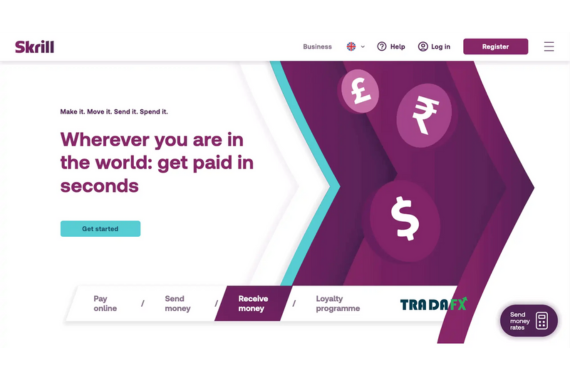
Until 2011, Moneybookers announced its rebranding to Skrill. Starting in 2013, Skrill acquired Paysafecard, a prepaid card from Australia, and in 2015, it officially merged with Neteller, one of its biggest competitors at the time.
Skrill is also the name of the e-wallet provided by this company. The Skrill wallet is a digital wallet that allows users to create accounts, deposit money into Skrill, store funds, withdraw money, and make online payments. Most countries support Skrill, so anyone over the age of 18 can register and use the Skrill e-wallet (except for certain countries listed below).
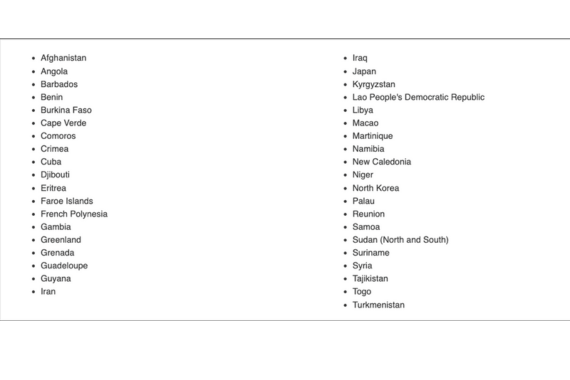
Note: Canadian citizens can only use Skrill to send CAD but cannot receive CAD through the Skrill e-wallet.
1.1. Features of the Skrill Wallet
The Skrill wallet meets the needs of a fast-paced, modern lifestyle where financial transactions need to be conducted quickly and conveniently. Currently, the Skrill e-wallet allows payments in over 40 currencies from different countries. Additionally, Skrill also supports cryptocurrency transactions. Below are the most common features of the Skrill e-wallet.
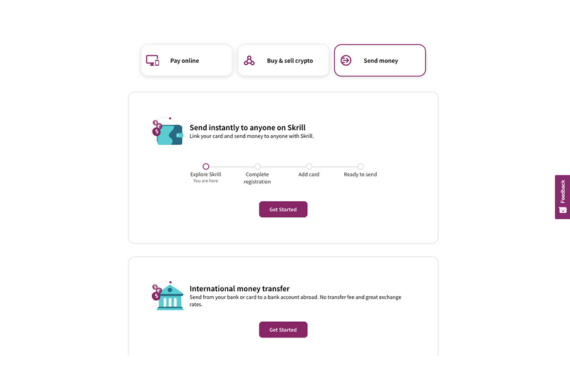
- Send and receive money for family and friends almost instantly.
- Accept payments, transfer, and receive money online with support for multiple currencies.
- Use for online gambling transactions, traders on forex platforms, and cryptocurrency exchanges.
1.2. Skrill E-Wallet Fee Structure
Before deciding to register and use any e-wallet or financial service, evaluating the costs alongside the benefits is always an important consideration.
Currently, Skrill offers three account tiers, each with different benefits and fees.
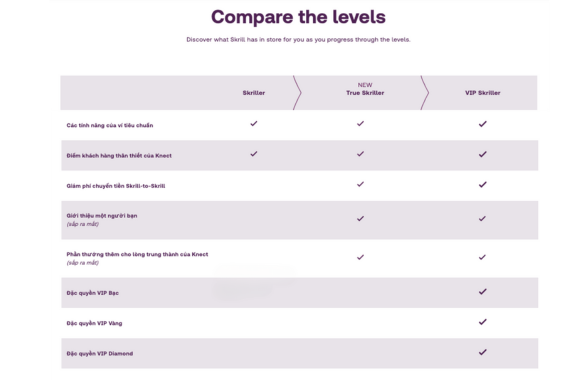
When you first register for a Skrill e-wallet, your account is set to the default Skrill Standard level.
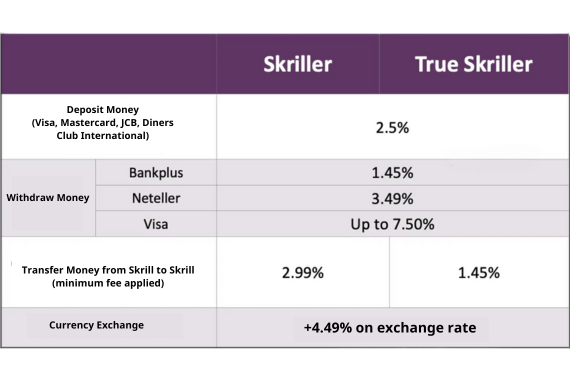
In addition to the fees mentioned above, you might incur additional charges, such as:
– International transfers (via debit card, Paysafecash, bank transfer through Sofort/Klarna): Up to 1%.
– International transfers via credit card: Up to 2.99%.
– Domestic transfer fees: Up to 2%.
– Account maintenance fee: Free (if you log in or perform a transaction at least once every six months). Otherwise, a fee of 5 EUR will be charged to your account.
– Account management fees: These include chargeback fees, prohibited transaction fees, and fees for refunding erroneous transactions.
For cryptocurrency P2P transactions, customers will incur a flat fee of 0.50% per transaction. Rest assured, all Skrill fees will be applied and displayed before you finalize any transaction.
2. HOW TO REGISTER AND VERIFY A SKRILL ACCOUNT?
Registering for a Skrill e-wallet account is completely free, and it takes less than a minute to complete. First, visit Skrill’s homepage -> Click on the purple “Register” button located at the top-right corner of the screen.
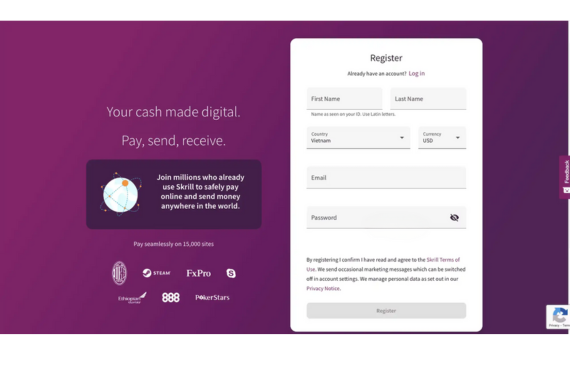
The website will display a form for you to fill out the necessary information. Once completed, click “Register” to finish the process.
As mentioned earlier, your Skrill e-wallet account will be set to the default Skrill Standard account. You can upgrade to a True Skriller or VIP Skriller account to enjoy transaction fee discounts and exclusive benefits.
With the required information provided, your Skrill account is typically verified within 5 minutes. However, the process may take 24–48 hours. Make sure all the images of the documents you submit are clear and easy to read.
For VIP accounts, you’ll enjoy unique benefits and privileges tailored to your needs.
With a VIP account, you will only need to pay certain fees, enjoy 24/7 support, higher transaction limits, participate in special tournaments, and have the chance to attend the best football, basketball, or cricket matches, festivals around the world, and more.
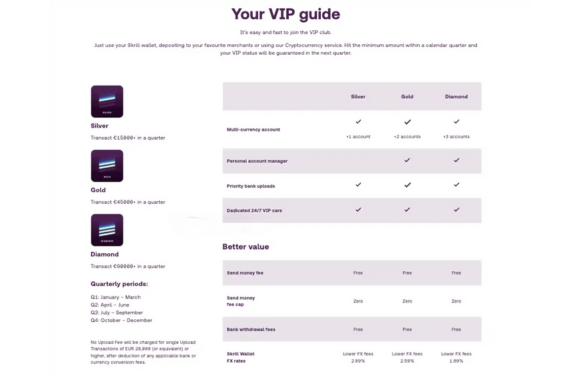
However, with a VIP account, you will need to meet a minimum transaction requirement each quarter to maintain your VIP status. You can check if you are a Skrill VIP by looking for the VIP badge on your account dashboard. All new Skrill VIP members will receive a confirmation email regarding their account status.
3. HOW TO DEPOSIT AND TRANSFER MONEY VIA SKRILL
To use your Skrill wallet, you will need to deposit money into it.
3.1 How to Deposit Money into Skrill
Users can deposit funds into their Skrill wallet using domestic and international bank cards. Currently, Skrill supports popular card types like Visa, MasterCard, JCB, Diners, etc. Note that you will need to verify your Skrill account before you can deposit money.
Each account level has its own limits, and you can increase these limits by:
– Uploading images of documents such as your driver’s license, passport, or ID card.
– Verifying your address or manually uploading address verification documents.
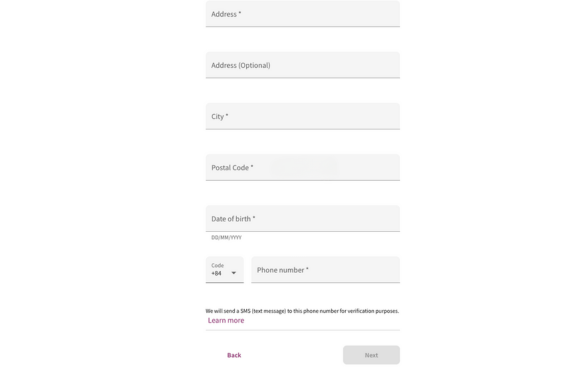
– Download the mobile app or take a selfie
– Receive a confirmation email.
3.2 How to Withdraw Money from Skrill Wallet
There are several methods for customers to withdraw money from Skrill. You can transfer funds from your Skrill wallet to your bank account as follows:
– Open the “Withdraw” section in your personal account.
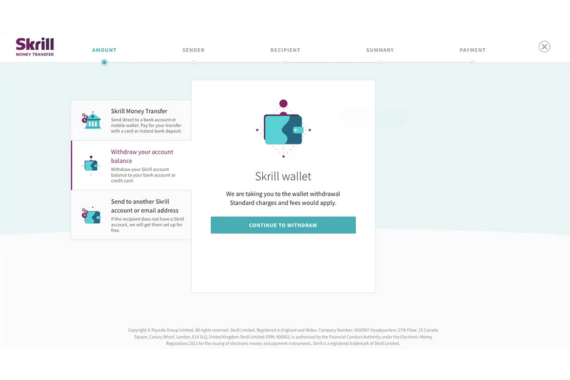
– You will have 3 options to receive money: Bank Account, Credit/Debit Card, and Mobile Wallet.
– The easiest way is to choose Bank Account and select Add a bank account -> Fill in your account information. (Each bank’s SWIFT code is different, you can search online or ask the bank’s support department).
– The Skrill system will ask you to upload some personal documents for verification.
– Enter the amount you want to withdraw and click “Next.”
– Double-check the information and click Confirm, then enter your PIN to complete the process. The withdrawal process will take about 2 – 3 days.
Some forex platforms also support depositing/withdrawing via Skrill wallets, such as FXPro, XM, Exness, etc.
4. OVERVIEW OF SKRILL REVIEWS
Before you can confidently use and deposit your money into an e-wallet that you know nothing about, you will definitely look for Skrill reviews online. No need to look far, today’s article will provide the most comprehensive reviews of this e-wallet.
4.1. Is Skrill safe?
When it comes to security, the question of whether Skrill is safe is likely your biggest concern right now. Based on Skrill reviews, it is extremely secure and strictly complies with payment card data security standards. It is licensed and regulated by the FCA – the world’s leading regulatory authority in the UK.
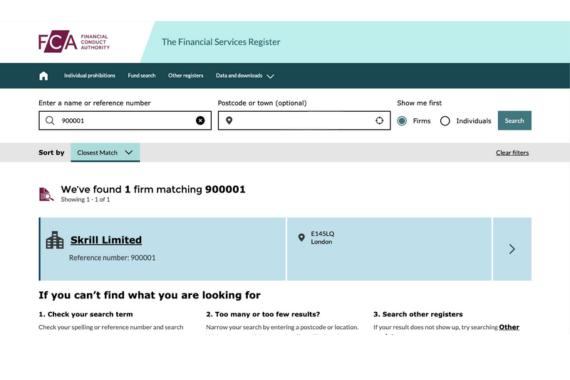
Skrill e-wallet uses 128-bit encryption and requires two-factor authentication (2FA) whenever you log in to the Skrill website. All your data is encrypted, making it difficult for hackers to read.
4.2. Skrill vs Paypal Comparison
The biggest difference between Skrill and Paypal e-wallets is that Paypal’s fees are much higher compared to Skrill. Below is a comparison table between Skrill and Paypal.
| Feature | Paypal | Skrill |
|---|---|---|
| Supported Languages | Paypal supports almost all languages | Skrill supports around 10 languages, including English and some popular European languages |
| Currencies | 20 currencies | 40 currencies |
| Verification | Users need to send a small amount of money to Paypal for verification | Provide proof, personal documents |
| Fees | Paypal charges the recipient | Skrill charges for deposits |
| Gambling Transactions | Paypal requires prior approval | Skrill allows and is linked with several gambling sites like PokerStars |
| Money Transfer Fees | 4.5% | 2.99% (Skrill account) |
Many also wonder if they can use Paypal for Skrill or transfer funds from Skrill to Paypal. Unfortunately, there is no way to transfer money directly from Skrill to Paypal or vice versa.
5. CONCLUSION
Skrill may not be the best payment processing system available, and it raises concerns about the non-negligible fees. However, the Skrill e-wallet offers convenience, supports various currencies, and is accepted in many countries. With today’s article, Tradafx has helped you better understand what the Skrill e-wallet is and how to deposit and withdraw money from Skrill. With the benefits it offers, why not try registering and using it now?
- t.me/finance_solutes
- Website: https://finance-solutes.com
- Hotline: +1 929 5636 439 ( Hotline )
- 26 Broadway, Suite 934, New York, 10004, US
