
 XM
XM Bybit
Bybit Binance
 IC Markets
 Pepperstone
 OKX
OKX Vantage
 VT Markets
 BingX
BingX Gate.io
 Kucoin
 MEXC
MEXC Exness
 Bitget
Accuracy and transparency are the two most important factors that every investor cares about when entering the Crypto market. As you can see, this market is continuously growing and attracting a large number of traders worldwide, meeting the strict demands of the community, such as checking transaction history, wallet balances, or Txn Hash, etc.
Etherscan is a search and lookup tool that addresses all the above issues within the Ethereum Blockchain network. So, what is Etherscan? What are its key features? How do you use this tool effectively? Let’s dive into the details with Forex in today’s article.
Let’s get started!
1. OVERVIEW: WHAT IS ETHERSCAN?
In its simplest form, Etherscan is a blockchain explorer specifically designed for the Ethereum network. It allows users to access features such as searching for transaction details, viewing transaction history, wallet balances, and wallet addresses. Additionally, all information displayed is transparent and publicly accessible.
Etherscan was launched in July 2015 by Malaysian CEO Matthew Tan. Over time, it has introduced many new features to enhance efficiency and attract more users.
Essentially, Etherscan functions similarly to explorers of other blockchains, such as Binance Explorer for the Binance Chain and Ont Explorer for the Ontology Blockchain.
1.1. Features of Etherscan
Etherscan’s database is meticulously indexed, and this information is published on its official website. Its sole purpose is to enhance the transparency of the Ethereum blockchain by indexing and presenting information clearly and comprehensively.
Many new traders often mistake Etherscan for a wallet service provider. However, it neither controls nor modifies any transaction details. Fundamentally, it operates similarly to explorers of many other foundational blockchains.
1.2. Purpose of Using Etherscan
When participating in the Crypto market, investors can use Etherscan to perform tasks such as:
Checking Ethereum wallet information – This is considered the main feature of Etherscan. By searching, you can view basic wallet details, such as tokens in the wallet, wallet balance in USD, and balance for each token type.
- Inspecting smart contracts of project tokens.
- Checking project wallet balances.
- Monitoring transaction statuses for ongoing transactions.
- Retrieving wallet details using a Txn Hash.
1.3. Solutions Provided by Etherscan.io
Currently, connecting with users through data brokers often fails to ensure security. To address this, Etherscan has chosen Opiria to connect directly with customers or gather personal user data through the company’s direct links.
Etherscan.io offers users the following solutions:
- Providing an open marketplace that ensures transparency for trading personal data.
- Offering quick and easy access to data.
- Allowing users to identify who is accessing or sharing their personal data.
- Offering appropriate compensation to users for sharing personal data.
- Enabling direct data transactions between customers and companies without intermediaries.
- Aiming to create innovative products for user convenience.
- Facilitating the sharing of approved data.
- Minimizing errors in data processing.
2. KEY FEATURES OF ETHERSCAN
There are numerous features to familiarize yourself with when using this technology. Start by visiting the website etherscan.io, and the main interface will appear.
2.1. Main Interface
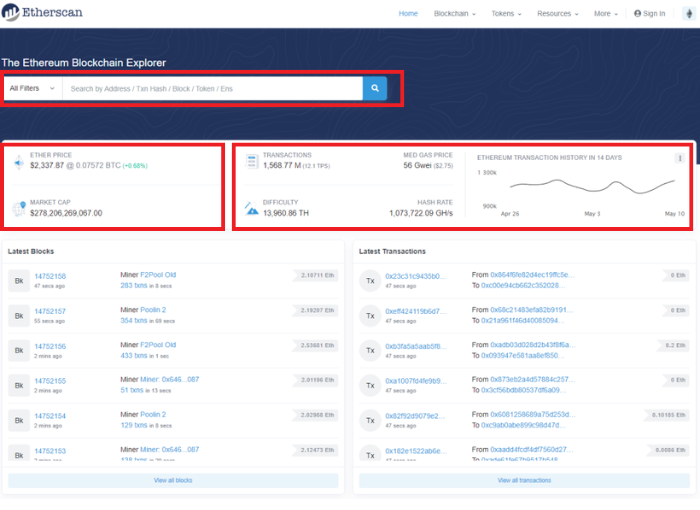
Observing the image above, you can see:
(1) Search Bar: Here, you can paste a wallet address, Txn Hash, Block, Ens, or Token to directly search for information.
(2) Basic Information about ETH: You can observe the price, 24-hour price fluctuation, and the total Market Cap of ETH.
(3) Real-time Information about Ethereum Blockchain Network Activities:
- Transactions: Total executed transactions.
- Difficulty: The mining difficulty of Bitcoin.
- Med Gas Price: The current average gas fee on the Ethereum network.
- Hash Rate: The hash rate of the network.
- Ethereum Transaction History in 14 Days: A graph showing the changes in transaction volume on the Ethereum Blockchain over the past 14 days.
2.2. Blockchain
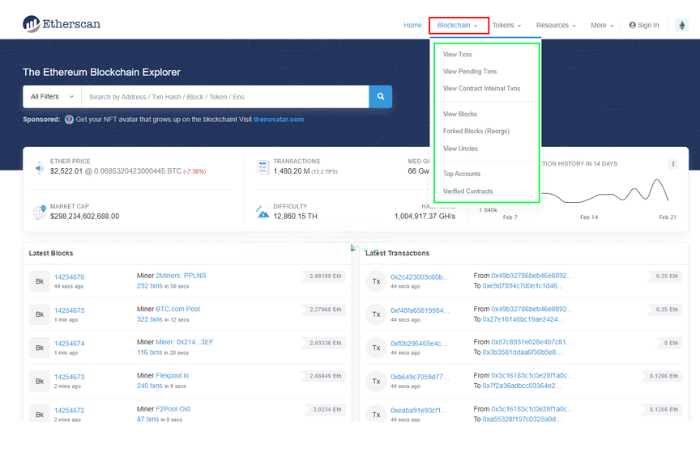
The Blockchain button allows you to delve deeper into critical information about Blocks, transactions, and top accounts:
- View Txns: Check all completed transactions on Ethereum.
- View Pending Txns: Review transactions that are currently pending.
- View Contract Internal Txns: Examine ETH transactions within smart contracts.
- View Blocks: Explore the pools mining the blocks.
- Top Accounts: View a list of wallets holding the most ETH.
2.3. Tokens
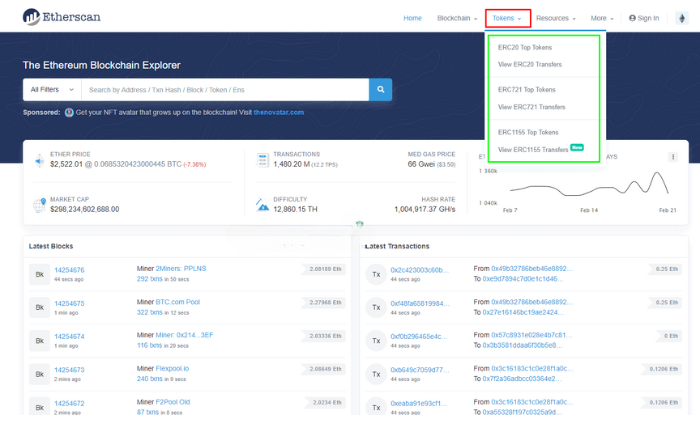
The Tokens button provides information about the two most popular token types on the Ethereum network, ERC-721 and ERC-20, including:
- Top Tokens: A list of the top tokens.
- View Transfers: Examine transactions for these two token types.
2.4. Resource
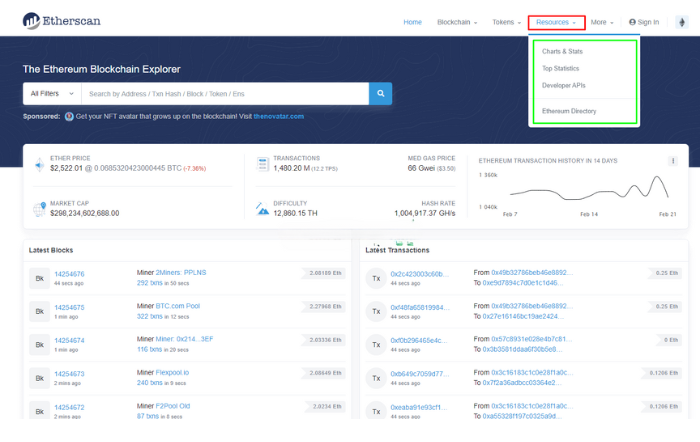
The Resource button includes the following sections:
- Charts And Stats: Contains charts and statistical data from the Ethereum Blockchain network.
- Top Statistics: Transaction statistics for top transactions, tokens, etc.
- Developer APIs: Create APIs based on Etherscan.io’s API.
- Ethereum Directory: Information on various projects, websites, and exchanges offering services related to Ethereum.
2.5. More
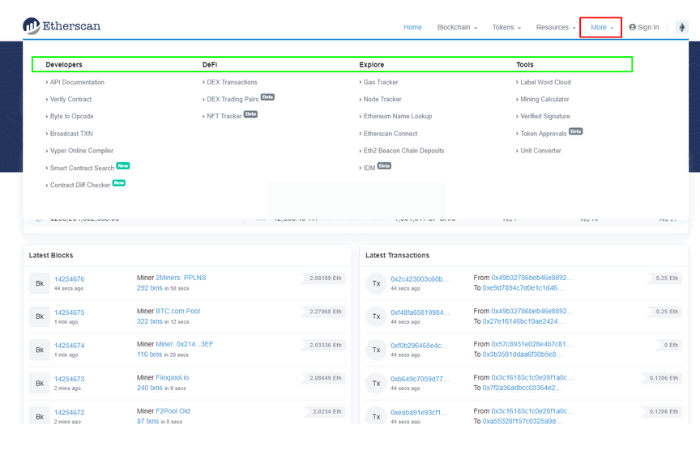
The More button includes the following sections:
- Developers: Information about Decode, APIs, and other resources that developers can use to further develop their projects. They can also search for Contracts based on Similar Codes.
- DeFi: Information related to DeFi projects and decentralized exchanges (DEX) on the Ethereum network.
- Explore: Check details about gas fees, connect to Etherscan, Nodes, etc.
- Tools: Check information related to mining calculations, decentralized storage service SWARM, and signature verification.
3. HOW TO USE ETHERSCAN IN THE MOST DETAILED WAY FOR BEGINNERS
In this section, Forex will guide you on how to use the basic features of Etherscan.
3.1. Check ETH Wallet – Ether
To do this, you first need the wallet address.
In the example below, Forex will use the following wallet address for illustration: 0x71C7656EC7ab88b098defB751B7401B5f6d8976F
Simply paste the wallet address into the search bar and click “Search”.
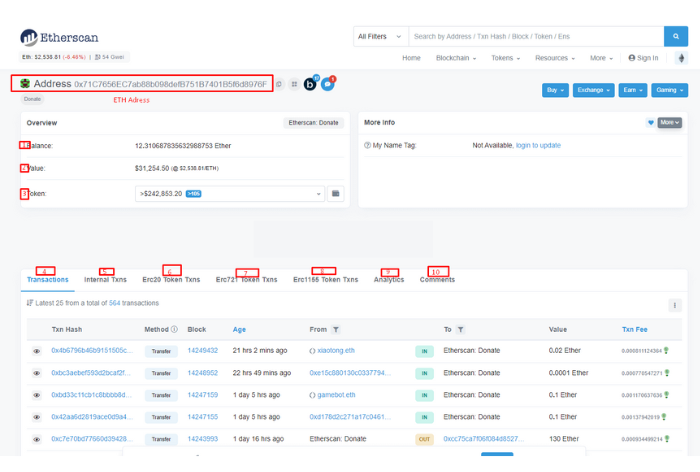
At this point, the information you will receive includes:
- Balance: The balance in the wallet (in ETH).
- Ether Value: The wallet balance (in USD).
- Token: A list of tokens in the ETH wallet. You can click on the box to view the full list.
- Transaction: A list of transactions made with that wallet.
- Internal Txns: Internal transactions.
- ERC-20 Token Txns: Transactions made with ERC-20 tokens only.
- ERC-721 Token Txns: Transactions made with ERC-721 tokens only.
- Loans: The loans and borrowings made.
- Analytics: Graphs and statistics related to transactions and wallet balance.
- Comments: Comments from Etherscan accounts about that wallet.
You can also add this wallet address to your watchlist by clicking the heart icon on the right-hand side.
3.2. Check ETH Transactions by Txn Hash
Txn Hash is the transaction code. Each transaction on the Ethereum Blockchain has a unique Txn Hash. By having the Txn Hash information, you can check the transaction, trace its history, and find wallet details.
In the example below, we paste the Txn Hash: 0x2414117c50741d5f5ee6107bb8bea2fe19d4400f3ce4e39b8f0835b829bc91ef into the search bar to check the transaction on the Etherscan Donate wallet.
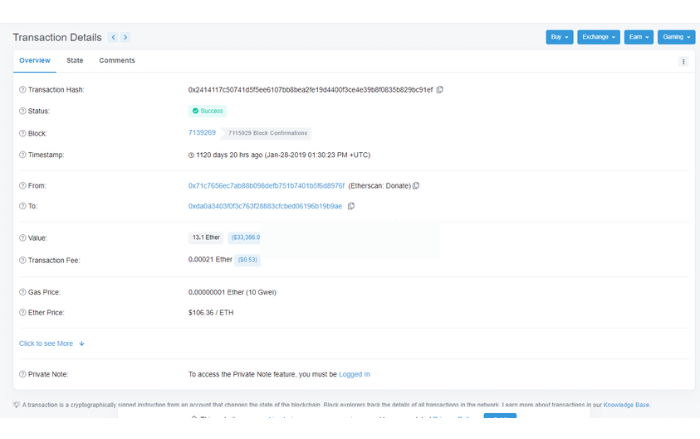
Some important information you should note includes:
- Status: The status of the transaction.
- Block: The block in which the transaction was recorded, in this case, block 7139269.
- From: The sender’s address.
- To: The recipient’s address.
- Value: The transaction value is 13.1 Ether (equivalent to $33,366.09).
When you make transactions transferring funds to others on the Ethereum Blockchain network, the transaction requires time to be confirmed. During this time, you can copy the Txn Hash and send it to the recipient so both parties can check the status of the transaction.
3.3. Check Tokens in the Wallet on Etherscan 101
After looking up the basic information, if you want more details about the different types of tokens and the balance of each token in the wallet, you can follow the steps shown in the image below:
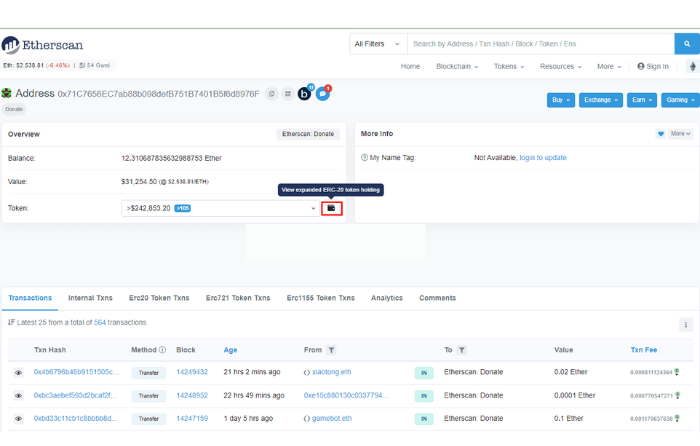
Click on View expand ERC-20 token holding, and detailed information about each token in the wallet will appear:
- 292 tokens are currently in the wallet.
- A detailed list of tokens and their respective balances will be displayed below.
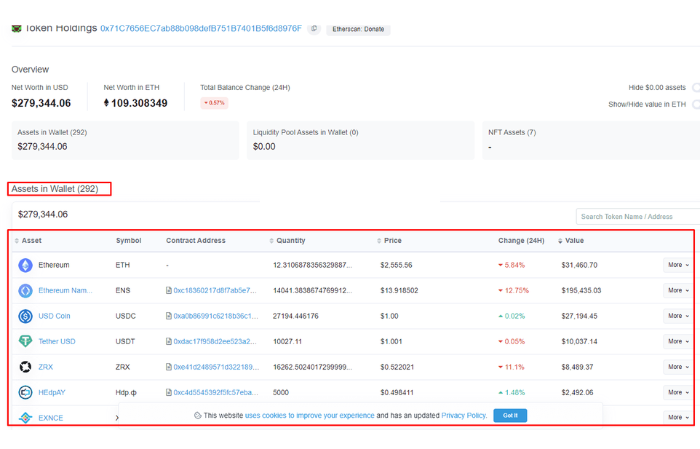
Checking this information is suitable for investors who often participate in Airdrops or Bounties. Many projects distribute tokens, but if you’re unsure about the distribution schedule, this method can help you check whether the tokens have arrived in your wallet yet.
3.4. Check DEX Information on Etherscan.io Wallet
Most of the first and most popular decentralized exchanges (DEX) in the cryptocurrency community are built on the Ethereum Blockchain platform. With the Etherscan tool, you can check some basic information about these DEX platforms.
To check the DEX Tracker Statistics, visit HERE.
The chart in the image below shows the top decentralized exchanges (DEX) and the number of transactions conducted on each platform. You can adjust the time frame for measurement and download the chart in your desired format.
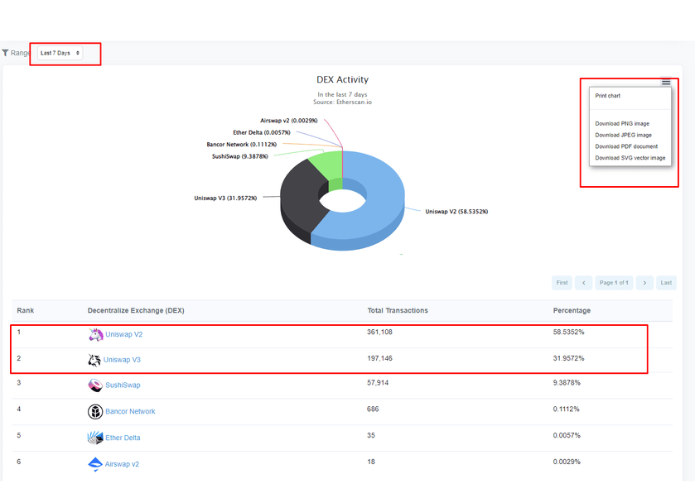
Based on the chart and information below, you can see the number of transactions for each Broker and its ranking. This allows you to understand the activity levels of these DEX platforms.
From the chart above, you can observe that Uniswap is the DEX with the highest transaction volume, including both V2 and V3. The total transaction volume from these two platforms in the past 7 days accounts for over 90% of the total trading volume on the Ethereum Blockchain.
3.5. Check Blockchain Events
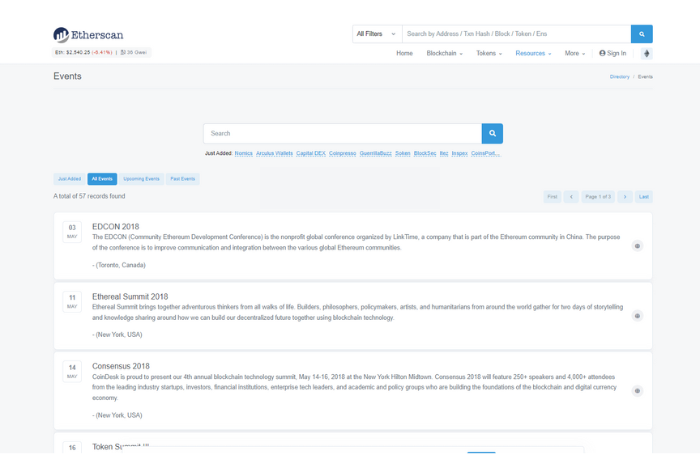
Some major global Blockchain events are listed on Etherscan. You can track the list of events HERE.
4. PROS AND CONS OF ETHERSCAN
In this section, let’s take a brief look at the strengths and limitations of the Etherscan tool:
4.1. Advantages
- Etherscan is considered the most reputable and reliable Blockchain Explorer at present.
- All information is public and transparent.
- With Etherscan, users can predict and understand the cryptocurrency market in general, or specific projects they are investing in.

4.2. Limitations
- The interface can be overwhelming for beginners due to the large amount of information displayed.
- You need to register an account in order to access many of the advanced features.
5. FREQUENTLY ASKED QUESTIONS ABOUT ETHERSCAN FOR BEGINNERS
Below are some commonly asked questions about the Etherscan tool that investors should be aware of:
5.1. Is it necessary to register an account on Etherscan?
No. As an end user, you do not need to register an account if you are only using the tool to check basic information.
5.2. Is Etherscan safe?
Using Etherscan poses almost no risk to users. This is because users are only looking up information about transaction wallets and are not required to provide any private keys or account details. Therefore, no one has access to control your account or wallet.
5.3. How does Etherscan make money?
As an end user, you are not required to pay any fees to use or search for information on Etherscan. Etherscan is not managed or invested in by the Ethereum Foundation. So, how does it generate revenue?
Similar to many other information-providing projects, the greatest value of Etherscan comes from the high volume of web traffic it receives. Its revenue comes from advertising and donations from the community.
- Advertising: With a large amount of traffic (up to 10 million visitors per month), Etherscan attracts advertisers looking to reach Ethereum-related audiences.
- Donations: This is money contributed by the community through ETH sent to their donation wallet.
6. SUMMARY
Above, Forex has provided you with the most detailed information about Etherscan, its key features, how to use Etherscan in the most comprehensive way, as well as its advantages and limitations. We hope the knowledge shared will help you in your research and understanding of Etherscan in the cryptocurrency market.
If you have any questions, feel free to leave a comment below, and we will respond promptly.
Wishing you success in your trading career!
- t.me/finance_solutes
- Website: https://finance-solutes.com
- Hotline: +1 929 5636 439 ( Hotline )
- 26 Broadway, Suite 934, New York, 10004, US
