
 XM
XM Bybit
Bybit Binance
 IC Markets
 Pepperstone
 OKX
OKX Vantage
 VT Markets
 BingX
BingX Gate.io
 Kucoin
 MEXC
MEXC Exness
 Bitget
Dubbed the “Internet of Blockchains,” Polygon is known as a rapidly growing blockchain platform in recent times. With scalability, fast transaction speeds, and low fees, Polygon serves as a Layer 2 solution that enhances the Ethereum network’s efficiency and cost-effectiveness. As a result, storing and managing assets on a Polygon wallet has become a trusted choice for many investors.
So, what is a Polygon wallet? How do you create and use one? Let’s dive into the details with Forex in today’s article.
Let’s get started!
1. OVERVIEW: WHAT IS A POLYGON WALLET?
In the first section of this article, let’s revisit what the Polygon project is and explore the Polygon wallet for new investors.
1.1. What is Polygon?
Polygon is a platform designed to support infrastructure development and scale the Ethereum ecosystem, also known as a Layer 2 solution.
This project provides all the existing Ethereum tools since it is supported by the Ethereum Virtual Machine (EVM). Simply put, Polygon offers users an Ethereum-like experience but with faster transaction speeds and lower fees.
Thanks to its scalability and user-friendly approach, decentralized applications (dApps) have been built on this platform, solidifying its crucial role within the Ethereum ecosystem.
Additionally, MATIC—the native token of Polygon—has secured a strong position among the top cryptocurrencies. The project’s founders even aim to make MATIC the third-largest digital currency, following only Bitcoin and Ethereum.
1.2. What is a Polygon Wallet?
A Polygon wallet is a digital wallet used to store MATIC and other tokens supported on the Polygon blockchain. Investors can send, receive MATIC and other tokens, and interact with dApps on this platform.
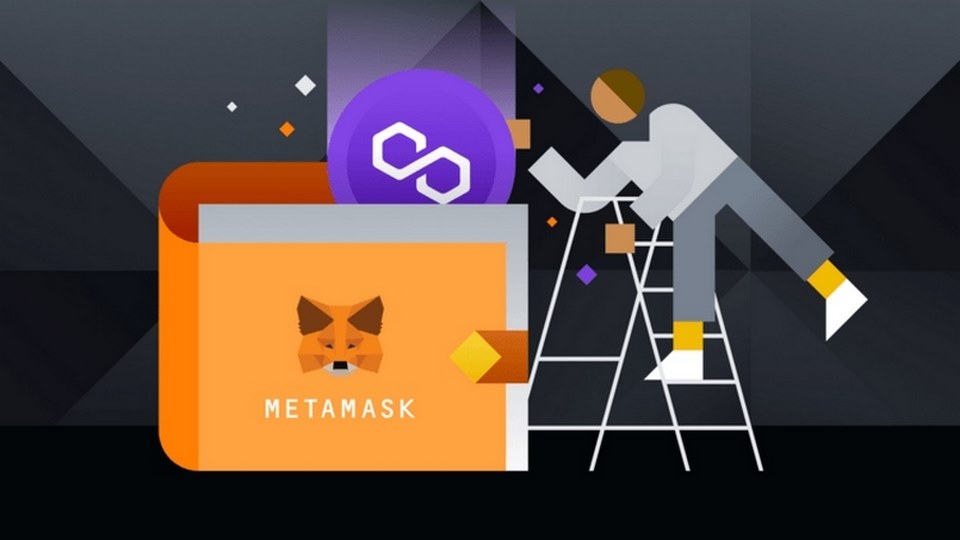
Most importantly, Polygon is a decentralized wallet, meaning you have full control over your assets—no one else can access or use them except you.
This type of wallet contains two crucial pieces of information that investors need to be aware of:
Polygon Wallet Address: This is a string of alphanumeric characters used to receive assets in your Polygon wallet. Others can also send funds to you using this address.
Passphrase and Private Key: These serve as security keys, similar to a password, to protect your wallet:
-
- Private Key: A string of letters and numbers.
- Passphrase: A sequence of 12 random English words.
Simply put, you can think of a Polygon wallet as a bank account, where the wallet address is the account number, and the Private Key/Passphrase is the password.
It is crucial to securely store your Private Key and Passphrase because you will need them to recover your wallet if necessary.
2. INSTRUCTIONS ON HOW TO CREATE AND USE A POLYGON WALLET
Next, Forex will guide you through the process of creating and using a Polygon wallet in the most detailed way.
2.1. How to Add the Polygon Network to MetaMask
First, you need a MetaMask wallet. Once you have successfully created a MetaMask wallet, follow these simple steps:
Step 1: Log into your MetaMask wallet via the web browser or mobile app.
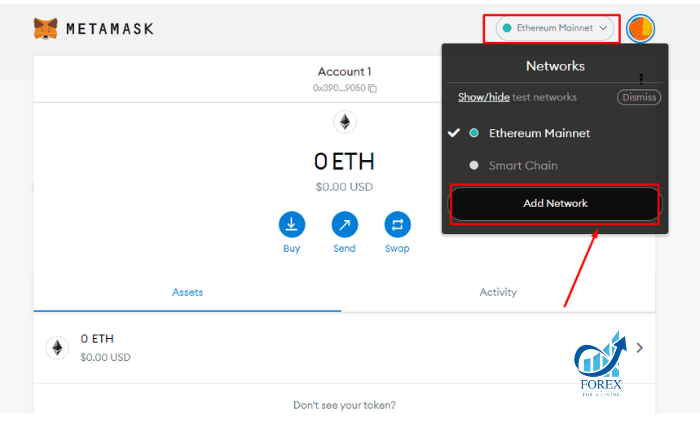
Step 2: On the main interface, click on Ethereum Mainnet, then select Add Network.\
Step 3: Fill in the parameters as shown below, then click Save.
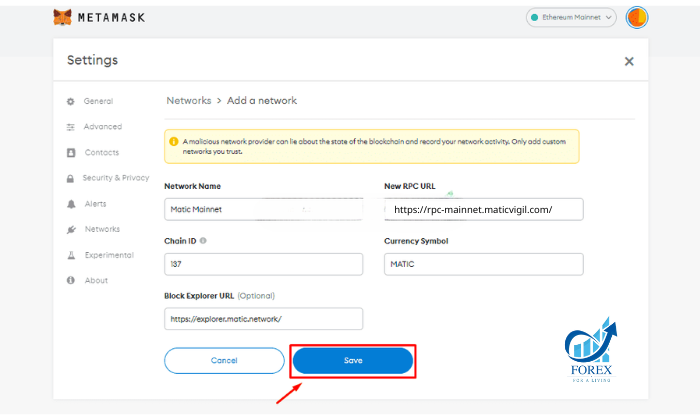
Parameters include:
- Network Name: Matic Mainnet
- New RPC URL: https://rpc-mainnet.maticvigil.com/
- Chain ID: 137
- Symbol: MATIC
- Block Explorer URL: https://explorer.matic.network/
Step 4: To switch to the Polygon network, do the same as step 2 and select the MATIC Mainnet network.
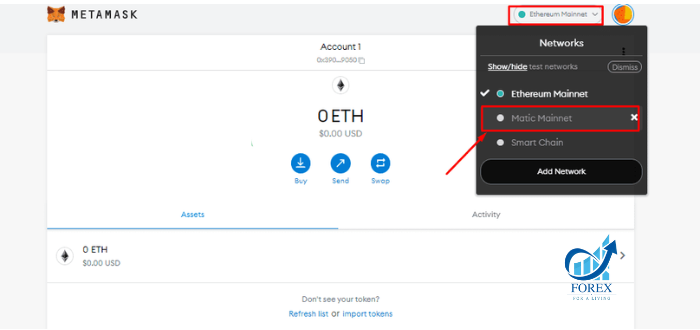
Once completed, your MetaMask wallet will switch to the Polygon network. At this point, you can interact with dApps on the Polygon ecosystem.
2.2. How to Transfer Tokens from Ethereum Mainnet to Polygon Network
To convert tokens from Ethereum Mainnet to the MATIC Network, follow these steps:
Step 1: Go to the official Polygon website [HERE]. In the upper right corner of the screen, click “Connect to a Wallet” and select MetaMask.
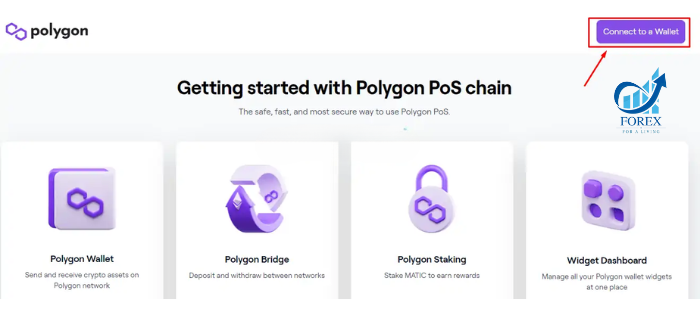
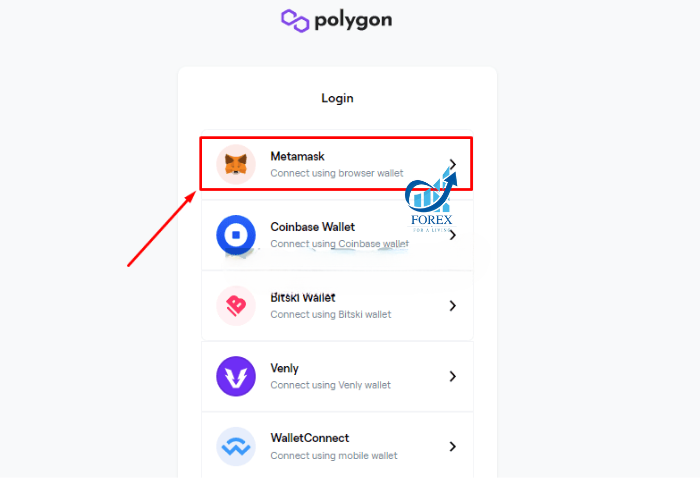
Step 2: Click Next, then click Connect and finally select Sign.
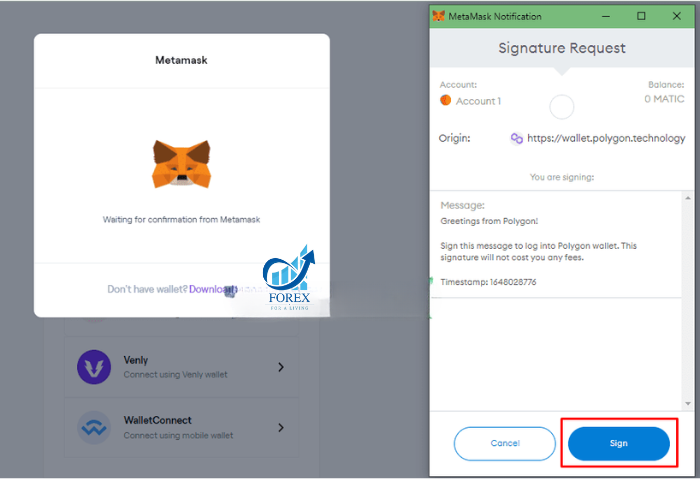
Step 3: After completing step 2, Matic Wallet V2 will open and be connected to your wallet address on Polygon. To transfer money to the Polygon network, click Move funds from Ethereum to Polygon.
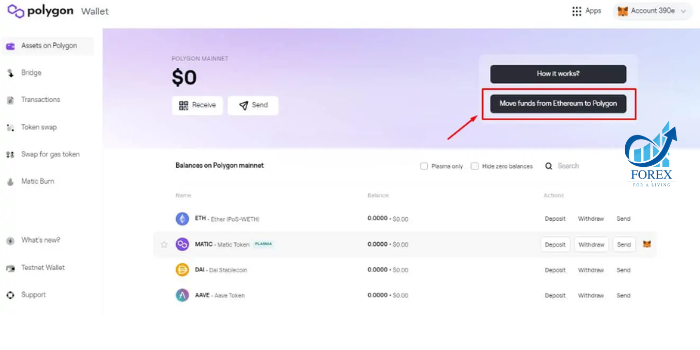
Step 4: Then, MATIC Polygon Bridge will be opened as shown below. The default token displayed on this Module will be ETH.
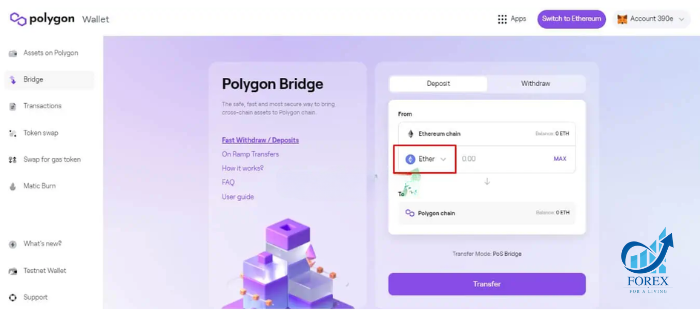
When clicking on the down arrow next to ETH, the token list will be displayed and investors can choose any token they want. In this article, Forex will choose CehhCoin from the list.
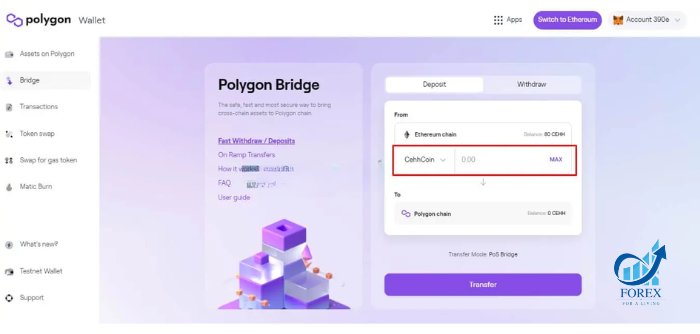
Step 5: Next, you will choose the amount you want to transfer. The available balance will be displayed next.
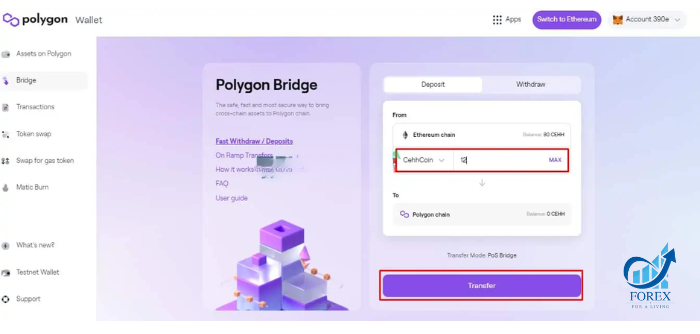
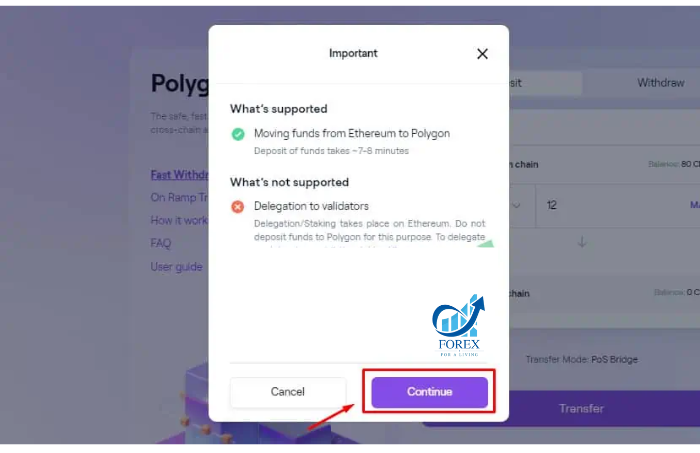
Step 6: Once you have determined the amount to transfer, click Transfer, the system will display a notification for you. Then click Continue to continue.
Step 7: You will then see some information about the transfer, the deposit process, and the cost of each transaction. Continue clicking Continue.
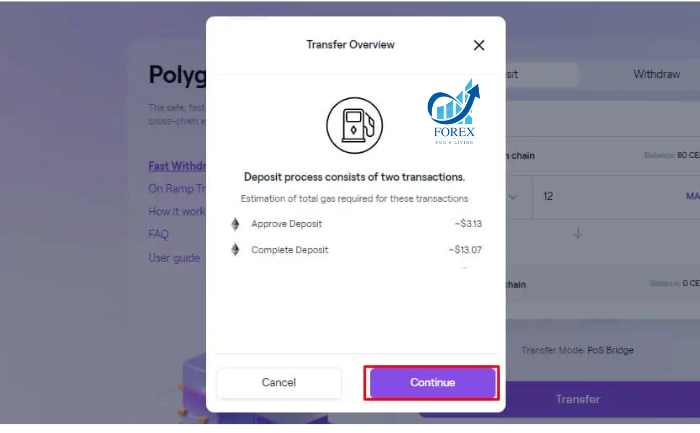
Step 8: After performing step 7, the screen will appear as shown below. Click Continue.
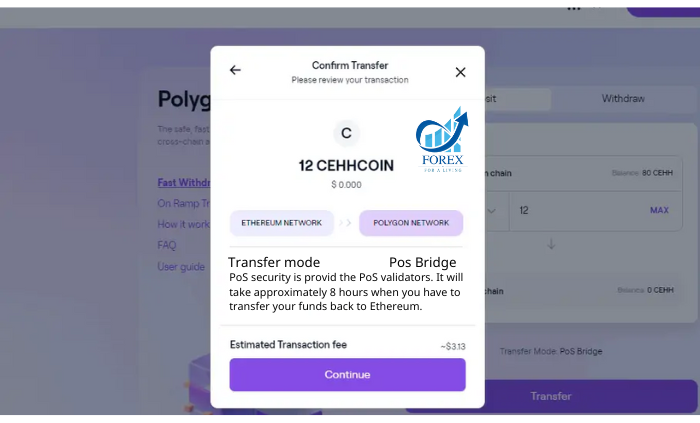
Step 9: Confirm the transaction in MetaMask to authorize the transfer. Click Confirm to proceed.
Step 10: Once confirmed, the system will take approximately 7–8 minutes to transfer your funds from the Ethereum network to the Polygon network via the MATIC POS Bridge.
3. FREQUENTLY ASKED QUESTIONS ABOUT POLYGON WALLET
Below are some common questions investors have about the Polygon Wallet.
3.1. Why should I create a Polygon Wallet on MetaMask?
MetaMask is one of the most widely used and standardized crypto wallets today. It supports interaction with multiple blockchains and is commonly used for testing on Testnet networks. By using MetaMask, investors can expand their portfolio and manage different blockchain assets within a single interface.
3.2. Where can I buy Polygon’s MATIC Token?
Currently, the MATIC token is listed on several reputable cryptocurrency exchanges. To purchase MATIC, investors can explore platforms such as Binance, Coinbase, Exchange, Digifinex, and more.
3.3. How can I make transactions on the Polygon Network?
To perform transactions on the Polygon network, investors need to have MATIC tokens in their wallets. These tokens are used as gas fees, similar to how ETH is used on the Ethereum network.
4. SUMMARY
In today’s article, Forex has introduced you to Polygon Wallet, along with a detailed guide on how to create and use it effectively. We hope that the information shared has helped you gain a better understanding of Polygon Wallet, as well as how to use it for your transactions.
If you have any further questions, feel free to leave a comment below, and we will get back to you as soon as possible.
Wishing you success!
- t.me/finance_solutes
- Website: https://finance-solutes.com
- Hotline: +1 929 5636 439 ( Hotline )
- 26 Broadway, Suite 934, New York, 10004, US
