
 XM
XM Bybit
Bybit Binance
 IC Markets
 Pepperstone
 OKX
OKX Vantage
 VT Markets
 BingX
BingX Gate.io
 Kucoin
 MEXC
MEXC Exness
 Bitget
What is Trailing Stop? Trailing Stop is a popular type of stop-loss order among traders. The reason for this is that, unlike fixed Stop Loss or Take Profit orders, Trailing Stop moves with the market price, allowing traders to lock in most of their profits in forex trading. Let’s dive into what exactly a Trailing Stop is and how it works.
Let’s get started!
1. What is Trailing Stop?
A Trailing Stop is a dynamic stop-loss order. Unlike a fixed Stop Loss, where you set a specific price level and your position is closed when the price hits that point, a Trailing Stop automatically adjusts as the market moves in your favor.
In the case of a Trailing Stop MT4, it moves in the same direction as the trade. This means that if your buy (long) position is making a profit, the Trailing Stop will move up, locking in the profit as the price increases by a certain number of pips. Conversely, for a sell (short) position, it will move lower as the price decreases.
This tool helps traders retain most of their profits in forex trades, even if the price moves against their original prediction. The reason for this is that when the price reverses, the trailing stop will remain fixed and act as a true stop-loss, ensuring that your profits are protected.
Trailing Stop: A Dynamic Stop-Loss Tool for Maximizing Profits
Trailing Stop, also known as trailing stop-loss, is a type of market order that sets a stop-loss at a specific percentage below the market price of an asset, instead of a fixed value.
1.1. Why Should You Use a Trailing Stop-Loss Order?
The Trailing Stop is an incredibly effective technical tool that traders should consider using when trading. If used correctly and at the right time, it can provide unexpected benefits. Here are some key advantages of using a Trailing Stop:
- Makes Exit Decisions Easier: Traders are often emotionally influenced when trading. Everyone hopes to maximize profits when in a winning position, and a trailing stop helps you lock in profits while also giving you an idea of when to use a take-profit order. It helps you “let your profits run” while maintaining control over the trade.
- Limits Losses in Trading: The principle behind a trailing stop is that it moves in the direction of profit. When the market reverses, the trailing stop becomes a static stop-loss. This helps you limit losses easily, as it automatically adjusts to protect profits and cut losses when necessary.
1.2. Difference Between Stop-Loss Order and Trailing Stop-Loss Order
Although both the stop-loss order and trailing stop serve the same purpose—cutting losses when the market reverses—they function differently:
- Stop-Loss Order: A fixed price level at which the trade is closed when the market moves against the trader.
- Trailing Stop-Loss Order: A dynamic stop that follows the market price in a favorable direction, locking in profits as the price moves in your favor, and turning into a fixed stop-loss when the price moves in the opposite direction.

Trailing Stop Order vs. Stop-Loss Order
The Trailing Stop order is designed to secure potential profits when the market moves in favor of the investor, while the Stop-Loss order aims to limit losses in case the market reverses unexpectedly.
- Stop-Loss Order: A fixed cut-off point set at a predetermined level. This order stays static, meaning it does not change as the market moves.
- Trailing Stop Order: A dynamic stop-loss that moves along with the market price in the direction of the trend, and stays in place when the market reverses. The trailing stop is considered a “dynamic” cut-off because it adjusts to market movements. When the price goes against the trend, it no longer moves but acts as a static stop-loss.
- Trailing Stop Level: The trailing stop level in forex cannot be smaller than the stop-loss level.
2. Setting Up a Trailing Stop on MT4
2.1. How to Set a Trailing Stop on MT4 Desktop
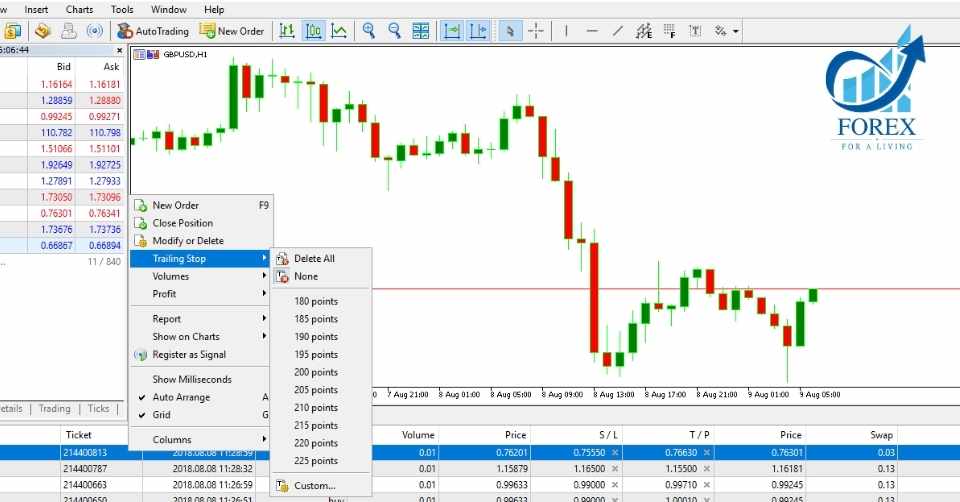
To set up a trailing stop on MT4 for desktop, follow these steps:
- Open the currency pair you are trading.
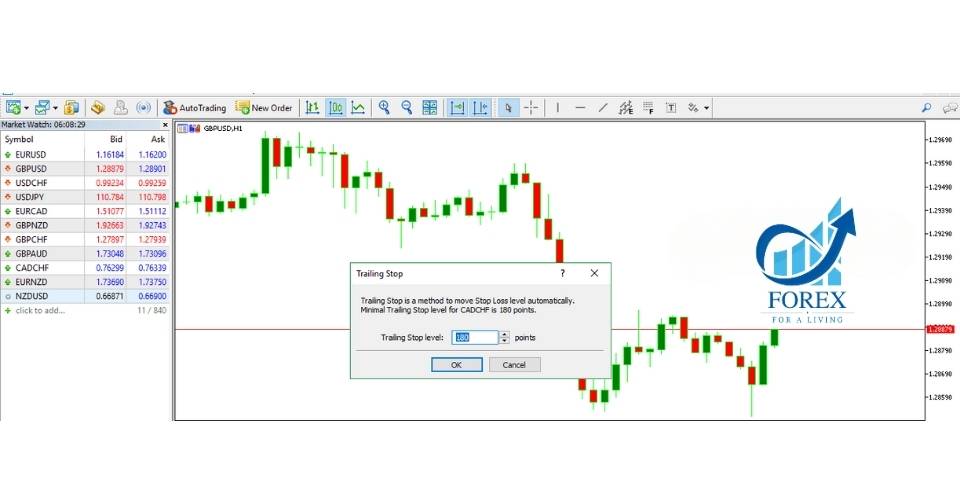
- Right-click and select “Trailing Stop,” then choose “Custom.”
- Select the desired stop-loss level that you want the trailing stop to adjust to.
- Click “OK” to finalize.
2.2. How to Set a Trailing Stop on MT4 Mobile
Currently, you cannot set a trailing stop directly on MT4 mobile. To use this feature, you’ll need to access your MT4 on a desktop and follow the steps outlined above.
3. How the Trailing Stop Works in the Forex Market
3.1. For a Buy (Long) Trade
When using a trailing stop on a long trade, the trailing stop price will increase by a set percentage as the market price rises. Each time the price goes up, a new trailing stop level will be established. This allows you to lock in profits as the market moves in your favor.

3.2. For a Sell (Short) Trade
When the price increases, the trailing stop will stop adjusting. A buy order will be placed if the price moves more than the predetermined profit margin compared to the lowest price, reaching the trailing stop level. At this point, the trade will close with a buy order at the market price.
3.3. Example in Action
Here’s a practical example of how a trailing stop works in securing profits:
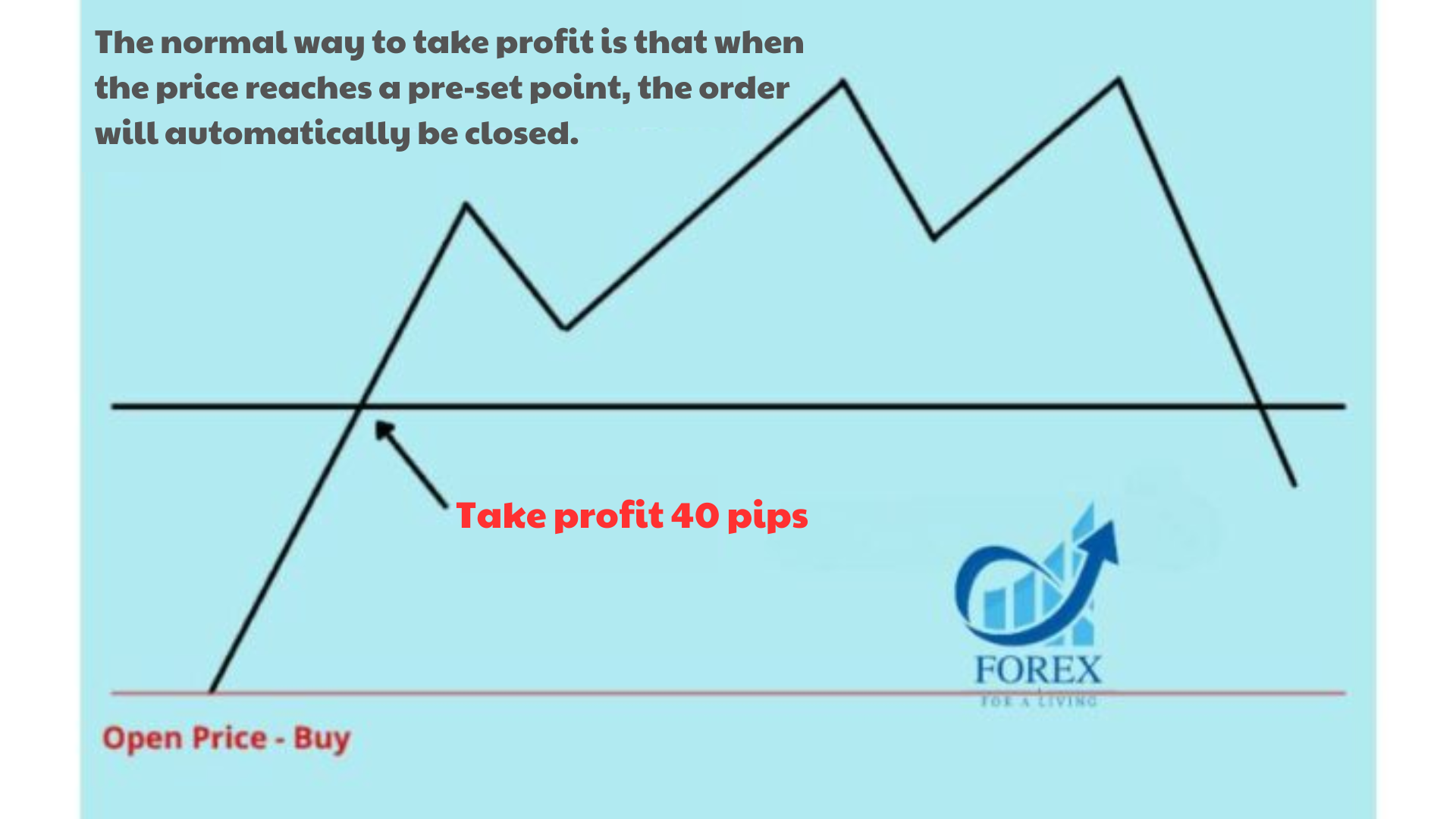
- Scenario: Suppose you predict that the price will move 40 pips in your favor and you set your take-profit point at that level. Once the price reaches that point, your order will automatically close.
- Problem: However, if the price continues to rise beyond the 40-pip target, you will miss out on additional profits.
This is where a trailing stop proves beneficial. By using a trailing stop, the stop-loss will move with the price as it increases, locking in profits along the way. When the price reverses by the set trailing stop amount, the position closes automatically, securing the maximum possible profit.
As shown in the illustration below (which you can imagine), the trailing stop adjusts as the price rises, ensuring that you capture more of the potential profit if the price continues to trend in your favor.

3.3. Practical Example
Trailing Stop Example
Here’s a specific example of a typical take-profit strategy. You predict that the price will move 40 pips in your favor, so you set the take-profit point at that level. When the price reaches that point, the order will close automatically. However, as you can see, the price continues to rise. Therefore, if you only take profit at the 40-pip point, you will miss out on further gains. Below, you will see the effect of using a trailing stop:
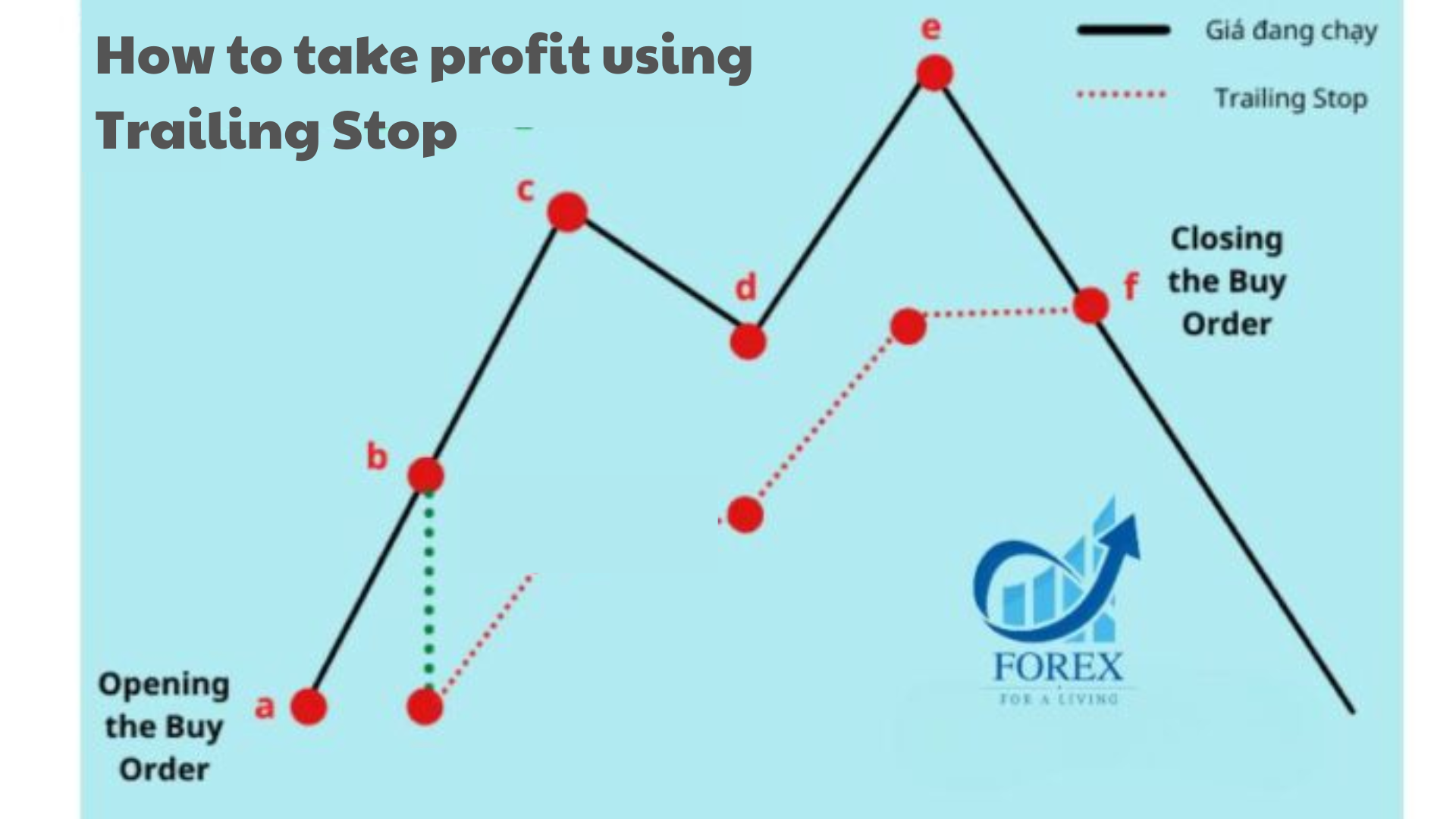
How to Take Profit with a Trailing Stop
In the image above, you enter a Buy order. After gaining profits, you start setting the trailing stop to 20 pips. As the price rises (point b), the trailing stop line will adjust upwards, maintaining a 20-pip gap (point b).
Then, as the price moves an additional 20 pips to (point c), the trailing stop will continue moving to (point c), keeping the 20-pip distance from the market price. This mechanism will continue until the price reverses, at which point the trailing stop line will remain fixed and act as a stop-loss.
If the price retraces by 20 pips or more, the price will hit the trailing stop level. At this point, the order will be closed, securing the profit.
Thus, using a trailing stop order will allow you to take a higher profit compared to the case where no trailing stop is set.
4. STRATEGIES WITH TRAILING STOP ORDER
4.1. Trailing Stop at a Bearable Risk Level
To implement this method, you need to determine the level of loss you are willing to tolerate (R) and set trailing stop levels such as 1R, 2R, …, nR. This is the simplest technical method to use the trailing stop order.
- For highly volatile markets, you may consider setting the trailing stop at 2R or higher.
- For low-volatility markets, you should set the trailing stop at the breakeven level, 1R. This method can help you secure the maximum profit before the market moves into a strong downtrend.
4.2. PSAR Trailing Stop
With this strategy, you will use the Parabolic SAR (PSAR) to set your trailing stop order. Specifically, when you see the candlestick chart approaching the PSAR point, you should set the trailing stop at the nearest PSAR level. This indicates a potential reversal, and you can close your position at a higher profit level.
Practical Example:

4.3. Trailing Stop at the X – Candle Method
In this strategy, you will use the highest and lowest prices of the previous candles for setting the trailing stop.
Example: If you’re using 3 candles for analysis and want to open a short position, place the trailing stop at the highest point of these 3 candles. On the other hand, if you’re opening a long position, place the trailing stop at the lowest point of these 3 candles.
4.4. Trailing Stop at Support and Resistance Levels
In this method, you rely on support and resistance levels to identify the peaks and troughs within the trend.
- Support: A level where the price tends to bounce up.
- Resistance: A level where the price tends to reverse or drop.
If you’re unsure about the exact peak or trough, you can set the trailing stop order at the support or resistance levels. This approach can help protect your trade if the market reverses unexpectedly at these key levels.
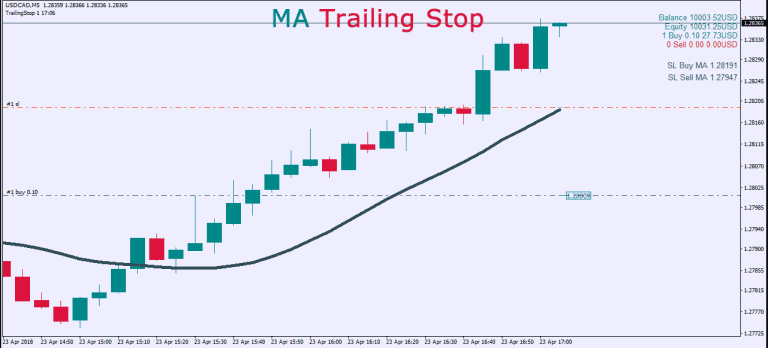
4.5. Trailing Stop at Moving Average Levels
In this method, traders set the trailing stop order in conjunction with a moving average (MA) indicator. A common choice is the 20-period moving average (MA20) or Simple Moving Average (SMA 20).
Example:
- If you’re in a long position, you could place the trailing stop just below the moving average, allowing the price to follow the trend but also protect against potential reversals.
- If you’re in a short position, the trailing stop could be set just above the moving average, similarly providing protection if the market starts to reverse.
By using the moving average as a reference, you can adjust the trailing stop dynamically as the market moves, ensuring you’re following the overall trend while securing profits if the market turns.
5. ADVANTAGES AND DISADVANTAGES OF THE TRAILING STOP ORDER TRADING METHOD
Advantages:
- Unlimited profit potential: No trader can predict exactly how much the price will rise or fall. Therefore, setting a fixed take-profit order and closing a trade too early, while the market trend is still strong, can lead to regret for not maximizing your profit. The trailing stop allows you to capture more profit as long as the trend continues in your favor.
- Saves time with automation: The trailing stop is fully automated, so you don’t need to constantly monitor the market or intervene manually. Once set, it works on its own to adjust the stop-loss level based on price movement.
Disadvantages:
- Not suitable for highly volatile markets: The trailing stop may not work well in markets with large fluctuations or for assets with high volatility. The position might close too early with a small profit, even though the price continues to move in your favor.
- Automation can also be a double-edged sword: While automation saves time, it can also lead to missed opportunities in highly volatile or fast-moving markets.
6. IMPORTANT CONSIDERATIONS WHEN USING TRAILING STOP ORDERS
6.1. Do not set the stop-loss level too tight or too wide
The key factor when using a trailing stop is setting the stop-loss level at a reasonable distance—not too tight or too wide. A stop-loss level that is too tight may be triggered by normal price fluctuations, preventing the trade from moving in the desired direction, especially for assets with high volatility. This may lead to small losses on trades that would otherwise have been profitable.

On the other hand, setting a stop-loss level that is too wide might not be triggered by regular market fluctuations, which means you could risk larger-than-necessary losses or miss out on more profits than necessary.
6.2. Trailing Stop Order will stop functioning if you close MT4/MT5 software
A trailing stop order works because of the trader’s intervention and is not a static order like Stop Loss or Take Profit, which are implemented on the server. Therefore, to keep the trailing stop active, the MT4 software must remain running. If you close the MT4 platform, the trailing stop will stop functioning. However, the stop-loss price will be recorded at the time the MT4 software is closed. When you reopen the platform, the trailing stop will resume its function.
7. SUMMARY
This article has provided detailed knowledge about the trailing stop order in Forex trading. We hope the information shared by TradaFX will help you understand and apply trailing stops in your Forex trading strategy.
Good luck with your trading career!
- t.me/finance_solutes
- Website: https://finance-solutes.com
- Hotline: +1 929 5636 439 ( Hotline )
- 26 Broadway, Suite 934, New York, 10004, US
